
The Square Golf Launch Monitor has generated massive buzz as the first photometric (camera-based) unit under $1,000. At $699 with zero subscription fees, it offers elite-level data, solid short-game tracking, and a “Swing Stick” for indoor practice.
However, despite the hype, it isn’t a perfect fit for every golfer. After side-by-side testing against the FlightScope Mevo Gen2, Rapsodo MLM2PRO, and SkyTrak Plus, I’ve identified several drawbacks that might be deal-breakers depending on your needs.
Here are five reasons you might want to skip the Square and look at an alternative.

Upgrade your indoor golf setup with the Square Golf Launch Monitor. This camera-based simulator delivers highly accurate ball and club data for under $1,000. Enjoy realistic gameplay with no expensive subscriptions. Perfect for compact home spaces!
Reason Number One: The Square Lives Indoors Only
Here’s the thing: this is the Square’s biggest deal-breaker, and there’s no way around it.
The Square completely fails when you take it outside. Sunlight messes with its cameras and infrared sensors, making it impossible to get accurate readings. Even worse, if you leave it in direct sunlight for too long, you’ll actually fry the internal components! That means you can’t bring it to the driving range, can’t use it in your backyard, and definitely can’t practice with it at the course.
Think about what that really means for your golf game. Maybe you’re picturing yourself using this in your garage during those cold winter months, then packing it up for summer range sessions. Well, forget about it, the Square stays home, period.
If you need something that works both indoors and outdoors, you’ll have to look at radar-based options instead. The FlightScope Mevo Gen2 runs about $500, while the Rapsodo MLM2PRO costs around $700, and the Garmin R10 sits at $600. These use radar technology instead of cameras, so sunlight doesn’t bother them one bit. Want a camera-based device that works outside? Get ready to spend at least $2,000 more.
Now, don’t get me wrong, the Square does shine in tight indoor spaces where those radar units struggle to get clean readings. Radar needs about 8 feet of ball flight to work properly, but the Square only needs 4 feet. That’s a huge advantage if you’re working with a small room or a low ceiling.
But let’s be real here. If any part of your practice happens outdoors, whether that’s weekly range sessions or just hitting balls in the backyard, the Square won’t cut it. You need a tool that follows you wherever you practice, not one that’s stuck in your basement.

Reason Number Two: The Build Quality Feels Cheap
When you unbox the Square, you get this weird mixed message. The packaging looks fancy, you’ve got multiple boxes, tons of accessories, and everything’s laid out nicely. But then you pick up the actual device, and it feels like a toy. The thing weighs practically nothing, less than a can of beer!
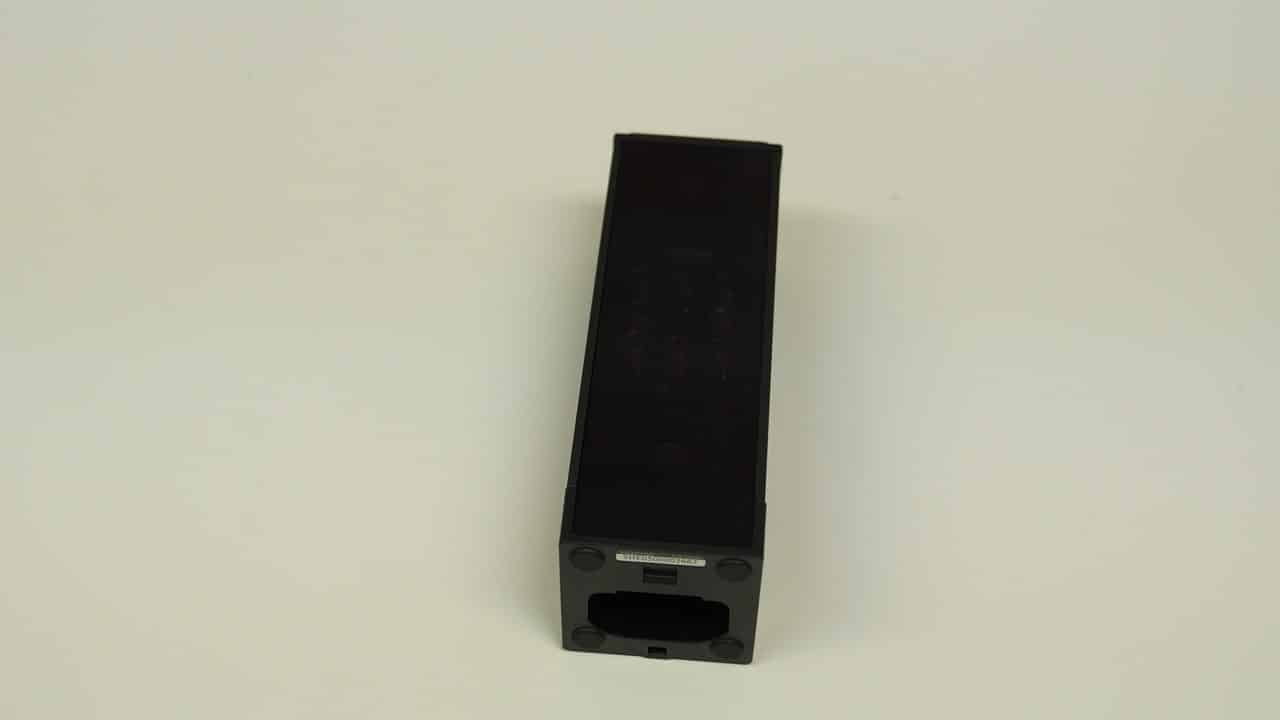
Now, here’s the thing: that lightweight feel might not seem like a big deal, but think about it. You’re setting this device just inches from where you’re smashing golf balls at full speed. You want something that feels solid, right? Not something that feels like it might blow away if you sneeze too hard.
What really gets me is what’s missing. There’s no carrying case to protect your investment, no protective cage around the sensors, and nothing to shield it from that inevitable shank we all hit sometimes. You know the one, where the ball shoots sideways instead of forward? Yeah, that ball could nail your Square directly, and there’s zero protection built in.
Even the alignment stick, which helps you position the device correctly, keeps falling out of its slot. It wobbles around like it was added at the last minute instead of being designed as part of the system. For a device that needs precise positioning to work properly, that’s not exactly confidence-inspiring.
The lightweight design creates another problem, too. Since it barely weighs anything, the Square doesn’t sit firmly on the ground. Got a slightly bumpy mat? The device shifts. Accidentally tap it with your foot? It moves. And here’s why that matters: even small position changes can mess up your readings. The device needs to stay exactly where you put it, or your data won’t be accurate.
Let me be clear, the Square works. It does what it’s supposed to do. But when you compare it to competitors like the MLM2PRO, SkyTrak+, or the R10, those units feel sturdy and built to last. They have some heft to them, some substance. The Square feels like what it is, a budget option trying to compete with the big boys.
If you’re planning to use this thing regularly, or if you want something that’ll hold up over time, this lightweight build should make you think twice. Sure, it functions, but durability matters when you’re investing in golf tech.
Reason Number Three: The Square Misses Key Data and Gets Wonky with Accuracy
Here’s the thing about the Square’s data: it gives you some surprising extras for $699, but then leaves out the basics you’d actually expect. You get club metrics that pricier devices usually lock behind a paywall, which sounds great! But wait, there’s no clubhead speed. No smash factor either. These are the numbers most golfers actually want to track their progress.
The Square does include a dynamic loft, which measures the angle of your clubface at impact. Sounds useful, right? Well, it would be if the numbers weren’t all over the place. Mine showed readings that made zero sense; we’re talking 10 to 15 degrees off what my actual loft should be.
Let me break down the accuracy situation. Your irons and wedges? The Square nails those pretty well. Ball speed reads true, and carry distances match what you’d expect. But grab your driver or fairway woods, and things get sketchy. The numbers start drifting, not terribly, but enough that you shouldn’t bet your swing changes on them.
Shot detection drives me a little crazy too. About every dozen swings, the Square just… doesn’t see your shot. Poof, like it never happened! If you’re just hitting balls for fun, no big deal. But when you’re working on something specific and need every shot counted, that missing data gets annoying fast.
The hitting zone creates its own headaches. It’s small, really small, and setting up your ball takes forever when you switch between clubs. Need to move from driver to 7-iron? You’re adjusting tee height, repositioning the ball, and hoping everything lines up right. The alignment stick that’s supposed to help? Mine kept falling over, which didn’t exactly inspire confidence in my setup.
Look, the Square works “well enough” for plenty of golfers who just want basic feedback. But if you need reliable numbers across your whole bag, or if tracking clubhead speed and smash factor matters to your improvement plan, you’ll end up frustrated. The fussy setup and random shot-detection hiccups make practice sessions feel like more work than they should be.

Reason Number Four: The Software Feels Half-Baked
Here’s the thing about the Square: while the hardware impresses, the software tells a different story. It’s basically the bare minimum you’d expect from a launch monitor app.
The app looks clean and works fine, but that’s about where the good news ends. You get basic driving ranges that do the job, nothing special. The closest-to-the-pin mode works, and so does putting practice, but neither will blow you away. Even the fictional courses they included, which actually look pretty decent, don’t match what you’ll find with other simulator software out there.
But wait, it gets worse. The Square doesn’t save your shot history or store your practice sessions! Think about that for a second. You can’t flag important swings, you can’t build dispersion charts (those maps that show where your shots typically land), and you definitely can’t track how you’re improving week to week. Sure, they let you export a CSV file, basically a spreadsheet, but come on, who wants to deal with that every time they practice?
This missing feature really hurts. The whole reason you buy a launch monitor is to track your progress, right? Square makes this way harder than it needs to be. Real improvement happens when you spot patterns over time, not just by looking at one number once. Without dispersion maps to show your shot patterns, without bag mapping to understand each club’s performance, and without trend lines showing your progress, you’re basically flying blind. Did that grip change actually help your slice? Was today’s good session a fluke or real improvement? Good luck figuring that out!
Meanwhile, competitors like the Rapsodo MLM2PRO cost about the same but give you a much better app experience. If having polished, useful software matters to you, and it should, the Square feels like taking a step backward instead of forward. The Rapsodo MLM2PRO not only enhances your practice sessions with its superior interface, but it also provides real-time feedback that can significantly improve your performance. If you truly value technology that complements your training, buy Rapsodo MLM2PRO now and elevate your game. The additional features and user-friendly design make it a worthwhile investment for serious athletes.
Reason Number Five: The Swing Stick Is a Gimmick for Most Golfers
Here’s the thing about the Square’s Swing Stick: it’s probably the feature that gets people arguing the most. You know what it is? It’s basically a short training club packed with sensors that lets you play simulator golf without actually hitting a ball. Sounds cool, right? The idea is that you can practice your swing in tight spaces, maybe even squeeze in a quick round in your living room while watching TV.
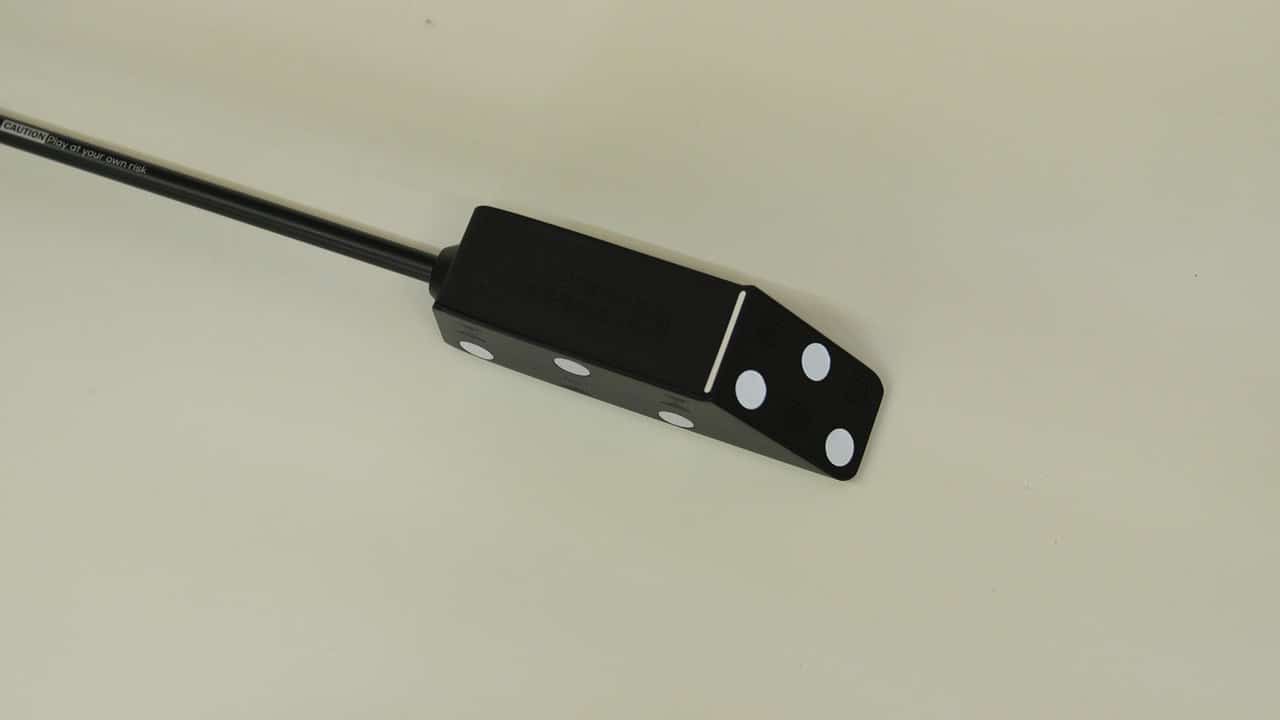
But let me tell you, it doesn’t really feel like playing actual golf. The distances you see on screen? They’re usually way higher than what you’d actually hit, think 20 to 30 yards extra on your drives! Your swing might produce a nice draw on the course, but the Swing Stick shows it flying straight as an arrow. Sure, kids love it, and if you’re brand new to golf, you might have some fun with it for a while. But if you’re serious about improving your game, you’ll figure out pretty quickly that this thing is more of a toy than a real training tool.
What really gets me, though, is that Square makes you buy it whether you want it or not. Every single Square package includes the Swing Stick, no exceptions. I’ve talked to other golfers who said they’d much rather have a protective carrying case for their unit, or hey, just knock $50 to $75 off the price! Makes sense to me. Think about it: instead of putting money into better software updates, stronger materials that won’t break after a season, or even including a basic alignment stick, Square decided everyone needs this novelty item. That tells you something about what they think is important.
Now look, if you’re buying this for the whole family, or you’re someone who literally has no space to take a full swing, then maybe the Swing Stick works for you. It could be a fun little extra that gets some use on rainy days. But for most golfers? It’s going to end up in that pile of golf gadgets you bought and never touched again, right next to that putting mat you used twice.
Upgrade your indoor golf setup with the Square Golf Launch Monitor. This camera-based simulator delivers highly accurate ball and club data for under $1,000. Enjoy realistic gameplay with no expensive subscriptions. Perfect for compact home spaces!
- Small and easy to carry.
- Accurate shot data.
- Simple to use.
- Fewer advanced features.
- Short battery life.
- Less accurate in windy conditions.
Frequently Asked Questions
Is the Square Golf Launch Monitor suitable for outdoor use at the range?
No. One of the most significant drawbacks is that the Square is strictly an indoor-only device. It relies on high-speed infrared cameras that are easily overwhelmed by direct sunlight, leading to inaccurate readings or a total failure to track. Furthermore, extreme exposure to sunlight can potentially damage the sensitive internal sensors.
How does the build quality compare to other monitors in its price range?
While the packaging is professional, the actual unit is often criticized for feeling “plasticky” and lightweight. Weighing less than a pound, it can easily shift if bumped or placed on an uneven hitting mat. Because it lacks a protective carrying case or a ruggedized outer “cage,” it is particularly vulnerable to damage from stray “shanks” or high-velocity ball impacts.
Are there any major accuracy concerns with specific clubs?
Yes. While the Square is generally praised for its accuracy with irons and wedges, it often struggles with high-speed clubs like drivers and fairway woods. Users frequently report “sketchy” data for these clubs, with ball speeds and spin rates becoming less consistent as swing speeds increase.
What essential metrics are missing from the Square Golf data set?
Despite offering some premium club data, the Square notably lacks Clubhead Speed and Smash Factor, two metrics many golfers consider essential for speed training. To get clubhead speed, you typically have to use specific shaft markers, which adds an extra step to every practice session.
Does the device have a restrictive hitting area?
Yes, the Square has a very tight “hitting zone” (approximately 15cm x 15cm). This requires the golfer to place the ball very precisely for every shot. Switching from a driver on a tee to an iron on the mat often requires recalibrating your physical setup or repositioning the unit itself, which can interrupt the flow of a practice session.
Who Should Skip the Square?
The golf tech landscape is shifting, and the Square is currently at the center of the tremor. As the first optical launch monitor to break the $1,000 price barrier, it’s making waves for all the right reasons, and a few concerning ones.
If you’re tight on space, this device is a literal game-changer. Unlike radar-based units that require a “runway” of depth to track ball flight, the Square’s camera-based system thrives in small indoor setups. Plus, it offers native GSPro integration without the headache of ongoing subscription fees, and yes, it actually tracks your putts.

About the author
Paul Liberatore
Paul Liberatore is the founder of Golfers Authority and a former four-year golf gear contributor to Sports Illustrated. He tests golf equipment hands-on to help golfers make better buying decisions.