
The biggest mistake you're probably making? Assuming ceiling mounts are always better without checking if your space actually supports them. The point is, ceiling installations need at least 8 feet of clearance, ideally 10 feet, plus 18-22 feet from screen to mount. If you don't have those dimensions, you'll fight shadows and cramped swings. Floor mounts offer flexibility and zero drilling, but they require short-throw projectors (0.5-1.0 ratio) to fill your screen from just 8-10 feet away. Stick around to uncover which setup actually matches your room's reality!
When you're setting up a golf simulator, one of the biggest decisions you'll face is whether to mount your projector on the ceiling or place it on the floor. The reality is: ceiling mounts are the most popular choice because they create that immersive, commercial-grade experience you're after. They keep your hitting area completely clear, eliminate shadows, and give you that clean, professional look with all the cables tucked away. Ceiling mounts also allow you to precisely align your projector for enhanced simulation accuracy. Floor mounts, on the other hand, offer serious flexibility, especially if you're working with lower ceilings or need something portable for a multi-use garage space. The catch? Floor setups can create light spillage that messes with your tracking system, and there's always the risk of clipping your projector with an errant shot! Cart-mounted options provide no installation required, making them perfect for those who want the easiest possible setup without drilling into walls or ceilings.
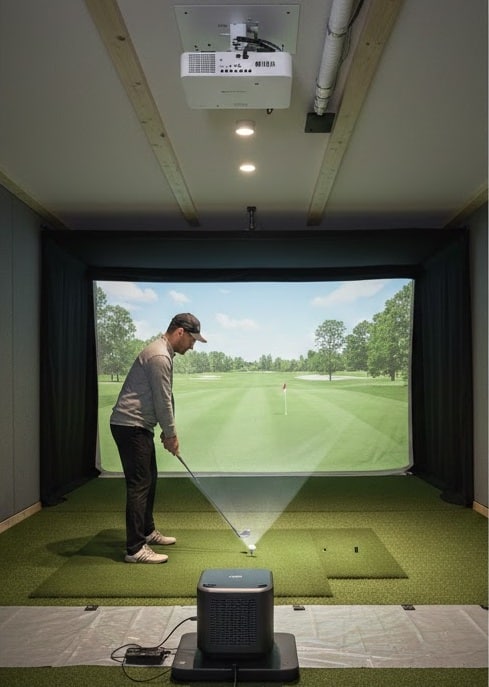
Before you start drilling holes in your ceiling, you'll need to nail down some critical measurements, and trust me, this isn't the time to wing it!
Your projector needs to be at least 8 feet from the floor to avoid golf ball impacts. For ideal setup, position the mounting rod's bottom edge at 10 feet from the floor, with 18 inches between the ceiling and projector bottom. Distance-wise, you'll want 18-22 feet from screen to mounting rod, close enough to prevent shadows (14 feet max) but far enough to avoid collisions (8 feet minimum).
For installation, you'll need a 1.5-inch pipe mounted rigidly perpendicular to floor studs. The BenQ CM00G3 universal mount works great since cables run through its shaft. Budget for conduit work if you're running power and HDMI across the ceiling. Ensure electrical outlets are available near the projector location to avoid extensive wiring modifications. Use a Laser Rangefinder to accurately locate the correct ceiling mount position before drilling any holes.
Ceiling mounts work great for many golf simulators, but they're not always your best bet. If you're dealing with low ceilings or renting your space, floor mounting makes way more sense. You won't need to drill holes or worry about your landlord's approval, which saves you headaches and money. Floor setups also give you incredible flexibility; you can adjust the height, angle, and position whenever you need to. Got a tall friend coming over? Just tweak the projector. Plus, you'll free up overhead space and keep your simulator room feeling open. The installation takes minimal tools, and you can handle maintenance yourself without climbing ladders. Floor installations eliminate blockage risks from players moving through your swing area. Just remember to protect your projector with a ramp or enclosure!
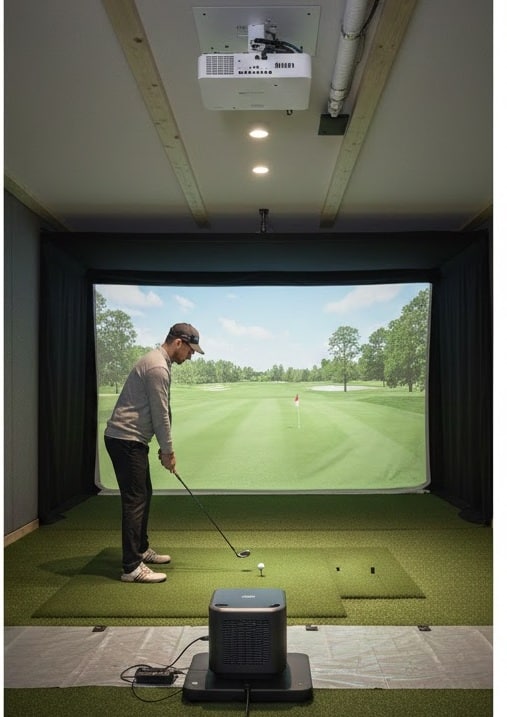
Once you mount your projector on the floor, you're locked into a specific distance from your screen, and that's exactly why you need a short-throw model. The important point is that most golf simulators only give you 8-10 feet between your projector and the hitting area. A standard projector would create a tiny image from that distance, but a short-throw model with a 0.5 to 1.0 ratio changes everything! For example, a 0.5 throw ratio projector sitting 8 feet away will give you a massive 15.9-foot-wide image. That's plenty for any golf simulator. Plus, short-throw placement keeps the projector forward enough to minimize shadows when you swing, which is vital for camera tracking accuracy. Floor-mounted projectors work best with protective housing solutions that shield them from errant golf balls while maintaining optimal ventilation. Proper installation also means mounting your projector off-center for optimal alignment using lens shift or keystone adjustment to fine-tune the image position without compromising picture quality.
You've calculated your throw distance, picked your mounting spot, and selected the perfect short-throw projector—but the fact of the matter is: don't drill a single hole yet! The key point is: temporarily positioning your projector at the calculated throw distance saves you from costly mistakes. Hold it in place (or have a friend help) and project a test image onto your screen. This confirms your image fills the screen properly and reveals any obstructions you missed during planning. Check horizontal centering to minimize keystone corrections later, which degrade image quality. Set your projection mode to ceiling mount and verify your aspect ratio, typically 4:3 for golf simulators. Walk the entire screen to confirm corner-to-corner focus uniformity before committing to permanent installation. During this test phase, adjust the height, tilt, and angle to ensure optimal image filling across your entire impact screen. Before finalizing your position, test all device connections, including your gaming PC, launch monitor, and any tablets you plan to use with the simulator.

You can use the same projector for both mounts, but only if it's a short-throw model. The key point is, regular projectors work great on ceilings but fail miserably on floors because they can't get close enough to fill your screen. Short-throw options like the BenQ AH500ST handle both setups with compatible ceiling kits like the BenQ CM00G3. Just remember, you'll need the right mounting hardware for dual-purpose use!
For sloped garage ceilings, you'll want a cage-attached mount like the SkyRailPlus. It slides 3-30 inches along a rail, letting you position your projector perfectly without guessing where to drill. If your ceiling's really angled, grab a vaulted ceiling mount with extension bars and a JR3 adapter; these come in 9 different drop lengths. They manage the angle while keeping your projector level, which beats wrestling with standard mounts that weren't designed for slopes.
You'll want to use a floor-mounted enclosure with ABS plastic construction, which is nearly indestructible against golf ball impacts. These enclosures feature turf-covered ramps that guide low shots toward your screen instead of into the projector. They fit most Optoma and BenQ models (around 15.2" x 14" x 5.7" interior dimensions) and include ventilation slots to prevent overheating. Best part? No ceiling drilling required, and your projector just slides right in!
Most projectors don't have true wireless built in, but you've got solid options. You can add a wireless HDMI transmitter like the Nyrius Aries, which works flawlessly between your PC and projector without lag. Some models, like the BenQ AH500ST, support optional WiFi adapters. Your launch monitor (Rapsodo, SkyTrak, Garmin) connects wirelessly to your computer, which then sends the image to your projector through HDMI, wired or wireless.
Wall mounting isn't recommended for golf simulator projectors. The reality is: it creates sight line problems between you and the screen, which ruins the immersive experience you're after. The angle also makes image alignment really tricky. Industry guides don't even mention wall mounting as an option because ceiling, floor, and cart mounts work so much better. Stick with those three proven methods instead!
Your projector placement will make or break your golf simulator experience, so don't rush this decision. Take time to measure your space twice, test different positions with a temporary setup, and consider your ceiling height before committing. Remember, there's no universal "right" answer; what works for your buddy's garage might be completely wrong for your basement. Choose the mount that actually fits your room, not the one that looks coolest!

