
Most golf simulators fail at putting because they use radar systems that can't track slow-rolling balls over short indoor distances; they need flight data that just isn't there on a 10-foot putt. Your best bet is Foresight's GCQuad ($22,499), which uses four photometric cameras to capture ball spin and speed within 1-2% accuracy by snapping 200 images at impact. For tighter budgets, the Exputt RG offers high-speed camera tracking with green customization without needing a full garage setup. We'll break down exactly why camera-based systems crush radar for putting and which setup mistakes kill your data accuracy.
When you're shopping for a golf simulator that can actually handle putting well, you'll quickly reveal that most systems fall surprisingly short in this department. The reality is: radar-based units estimate spin indoors, which creates serious inaccuracies when you don't strike dead-center. Budget systems simply can't replicate the precision greens you'd find on real courses, and their turf roll behavior differs drastically from actual fairways.
What separates accurate putting simulators from the rest? Advanced camera-based systems like Foresight QuadMAX use photometric tracking to measure your putting data precisely. Even better, technologies like 3Trak capture 3D ball position in the initial few feet of flight, which matters tremendously for short shots. High-end setups achieve 95–98% distance realism, though putting still remains less consistent than full swings. Depth perception challenges make it particularly difficult to judge breaks and distance on virtual greens compared to outdoor putting surfaces. Quality simulator enclosures can improve tracking reliability by providing controlled lighting conditions and reducing environmental interference during data capture.

The most accurate putting simulators on the market rely on four-camera photometric tracking systems, and you'll find this exact technology in both the Foresight GCQuad and QuadMAX, the same units trusted by PGA Tour professionals. Here's what sets them apart: these cameras actively track your ball's spin rate rather than guessing at it, which means you get reliable data even on off-center strikes. The GCQuad delivers identical accuracy to the fully loaded QuadMAX system at $22,499, using photometric tracking that captures every detail of your putting stroke. You're getting ball speed, launch angle, spin rate, and clubhead speed measurements that translate to carry distances within 1-2% of actual on-course performance. That's the precision level professionals demand. These camera-based systems excel at measuring launch angles and spin by capturing ball data just after impact, making them particularly effective for indoor putting analysis. Adequate lighting enhances the high-speed camera tracking capabilities, ensuring clean data capture during your putting sessions.
If you're looking to dial in your putting stroke without breaking the bank, you've got solid options that sit comfortably under $10,000, and some that'll save you even more cash than that. The Exputt RG stands out as a putting-specific powerhouse, using high-speed cameras and AI-driven tracking to analyze your stroke. You'll get feedback on ball speed, face angle, putter path, launch direction, and tempo, all the metrics that actually matter. The thing is: it doesn't require a garage bay, projector, or expensive launch monitor. Just a flat floor and a TV. The Explorer Mode lets you customize green speed, slope, and pin placement for realistic practice scenarios. It's purpose-built for putting, which means you're not paying for full-swing features you won't use. Unlike full simulator packages that need around 9 feet of ceiling height, dedicated putting systems work in nearly any room of your home. For groups practicing together, the ease of use becomes crucial since varying skill levels need quick transitions between players without complicated setup adjustments.
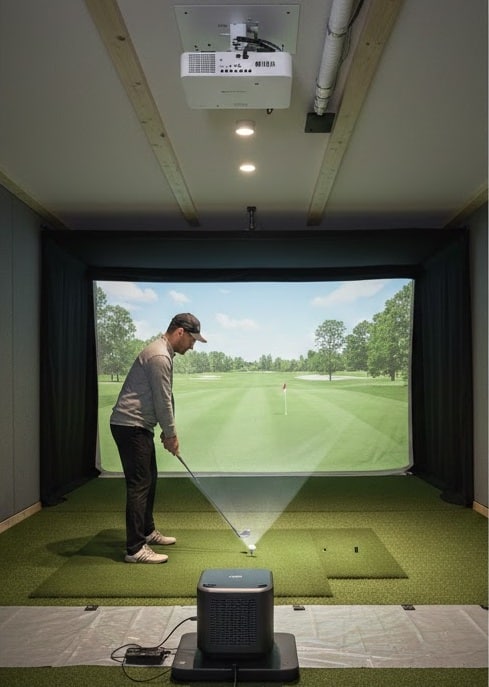
Moving beyond dedicated putting systems, you might be eyeing full-featured launch monitors that promise to track everything from drives to delicate putts, but here's where things get tricky. Foresight's photometric cameras crush radar on the green. Why? They capture ball data immediately at impact using high-speed cameras, while radar needs flight distance to calculate spin and speed. FlightScope's Mevo+ struggles indoors on short putts without full ball flight visibility; it simply can't gather enough data in three feet of roll. Meanwhile, Foresight's GC3 delivers millimeter-accurate strike data by capturing 200 images at impact, tracking dimple rotation instantly. The GC2 operates without requiring additional ball markings, unlike the FlightScope, which needs a silver dot on the ball indoors for accurate readings. The Mevo+ uses Fusion tracking technology, combining 3D Doppler radar with high-speed image processing for enhanced accuracy. Pros overwhelmingly choose Foresight camera systems for precision requirements. For putting specifically, photometric technology wins hands down.
Even with a $15,000 Foresight GC3 in your garage, you'll get garbage putting data if your setup's fundamentally broken. The reality is: most guys blame their launch monitor when really it's their hitting mat sliding around or turf that's not cut flush with the surface. Artificial turf placed under your hitting mat causes slipping and misalignment that destroys putting accuracy. You need specialty putting turf, not that high-pile stuff that holds the ball up like a tee. Room depth matters too; photometric units need proper placement distance, or you're tracking ghost putts. And lighting? Poor visibility kills sensor accuracy fast. Your artificial surface can't bounce balls back off walls like real greens do, which throws off distance control. Camera-based monitors require repositioning when switching between right-handed and left-handed players, which means constantly tweaking alignment settings that screw up your putting line data. Fix these basics before questioning your tech.
While you're obsessing over whether your SkyTrak tracks ball speed to three decimal places, tour pros are making their real money with something way simpler: an iPhone app that reads greens.
Here's the thing, your launch monitor nails stroke mechanics but completely ignores the biggest factor in making putts: slope and speed. Tour Read's iPhone gyroscope measures the exact slope when you lay it on the green, then pairs that data with green speed for instant reads. On a 6-foot putt with 2% slope, you'll need to aim 3 inches outside the hole, not the 1 inch you'd eyeball.
PGA Tour players hit their start line within 1% accuracy 90% of the time, and that formula-driven precision is what separates making putts from analyzing your backstroke for the thousandth time.

It depends on what you've got! If you own a Foresight GCQuad or QuadMAX, you're golden; they'll read impact location with reflective stickers and give you tour-level data. The Square works great for $699, handling 2-footers to lag putts with accurate ball speed and launch angles. The key point is: cheaper photometric units need strict positioning (those 15x15cm zones matter!), and Mevo+ only works if it's perfectly level with your ball. Setup determines everything.
Yes, they absolutely do! Over 300 PGA Tour pros use Trackman, and guys like Bryson DeChambeau rely on Puttview as their "putting weapon." Ian Poulter even endorses Zen Oracle for practicing sloping lies. The reality is, Tour pros make 96% of putts from 3 feet and 99% inside 2 feet, and they use simulators to maintain those insane numbers through data-driven practice sessions.
For putting-focused simulators, you'll need way less ceiling height than full-swing setups. Since you're just rolling putts, 7-8 feet works perfectly fine, no driver swings means no ceiling worries! You could honestly set up in a basement with standard 7-foot ceilings without issues. The real space concerns shift to the floor area for your putting green mat, not vertical clearance above your head.
Putting simulators measure break using high-speed cameras that track your ball's path in real-time, combined with sensors that detect launch angle and speed. The system then calculates how slope affects your putt; for example, a 3% gradient (about 1.72 degrees) will curve your ball predictably based on speed. Advanced models like GC Quad measure start direction accurately within less than a foot on projected distances, giving you instant feedback on your read.
It depends on what you're buying. Foresight's GCQuad puts add-on costs at $2,500 upfront but needs no subscription; you own it forever. However, PuttView requires $1,495 annually after the initial free year. Third-party software varies wildly: GSPro runs $250 yearly, E6 Connect offers a one-time $1,000 license or annual subscriptions at $300-$600, and Creative Golf 3D charges $500 once. Always check if subscriptions apply before purchasing!
You've got the facts now, so here's the bottom line: most putting simulators under $5,000 just won't cut it for serious practice. They'll miss the tiny details that actually matter, like that half-degree of face angle at impact. If you're serious about lowering your scores, invest in photometric tracking and quality green-reading software. Your strokes gained stats will thank you later!

