You’ll need at least 10 feet wide by 10 feet deep with 9-foot ceilings for your GC3 setup, though that’s the absolute minimum. For a truly comfortable experience, aim for 12 feet wide by 15 feet deep with 10-foot ceilings, especially if you’re swinging driver with confidence. The GC3 sits just 2 feet in front of your stance area, making it way more compact than radar systems that hog 21 feet of depth. Keep exploring to uncover ideal placement tips and configuration options that’ll optimize your space.
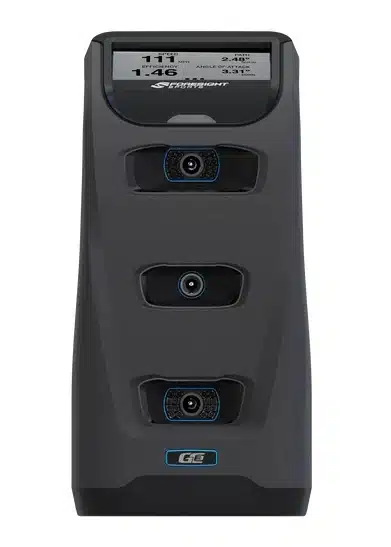
Unlock every shot's secrets with the Foresight GC3 launch monitor. Designed for precision and packed with features, it delivers pro-level golf data for your best game yet.
Minimum Room Size for Your GC3 Simulator
Three key measurements matter when you’re planning your GC3 simulator space: width, depth, and ceiling height. You’ll need an absolute minimum of 10 feet wide by 10 feet deep by 9 feet tall to make it work. That’s the bare-bones setup that’ll let you swing without cracking your club against the walls! For a more comfortable experience, you’re looking at 12 feet wide by 15 feet deep. The important point is, this gives you room to actually see your ball flight and prevents those awkward ricochets back at you. The sweet spot? An 18-foot-by-16-foot room with 10-foot ceilings. This isn’t just wishful thinking; it’s what’ll give you that immersive, stress-free golfing experience without constantly worrying about your backswing. The GC3’s compact design means you won’t need to dedicate excessive width to the monitor itself; just about 2 feet of space handles the unit comfortably. The sleek and portable design makes setup straightforward in garages, basements, or spare rooms.

How Much Ceiling Height Does the GC3 Need?
How high should your ceiling be for a GC3 setup? You’ll want at least 9 feet for comfortable swings, but the reality is, 10 feet is the sweet spot. At 10 feet, you can swing your driver confidently without worrying about ceiling contact. Think of 9 feet as workable and 10 feet as ideal.
If you’re working with 8.5 feet, you might manage with irons and wedges, especially if you’re shorter. Anything below 8 feet? That’s pushing it. Your height and swing plane matter too; golfers over 6 feet need extra clearance, while shorter players can work with less.
Test your swing before committing! A few practice swings with your driver will reveal whether you’ve got enough room or need to adjust your setup. For the most optimal experience, ensure you can swing without obstruction in your designated space. Understanding the space requirements for golf simulators is essential to achieving the best results during practice. Consider factors such as the height and width of your setup, as inadequate space can hinder your performance. By assessing the dimensions of your area, you can create an environment that maximizes both comfort and efficiency while practicing your game.
Where to Place Your GC3 in Your Simulator Bay
Once you’ve confirmed your ceiling height works, the next critical decision is figuring out where your GC3 actually sits in the room. The important point is that the GC3 is a camera-based unit, which means you’ll position it about 2ft forward from where you stand. This forward placement gives the cameras a clear view of your ball at impact. You’ll need that 2ft of accessible space on the floor to accommodate the monitor itself. The beauty of the GC3 is its compact footprint; it doesn’t hog precious width like some other systems. Just make sure it stays level with your hitting surface vertically for accurate ball tracking. The sleek, portable design also lets you reposition it easily if you need to accommodate both right- and left-handed players!

Indoor vs. Outdoor GC3 Setup Configurations
Your Foresight GC3 works beautifully in both indoor and outdoor settings, but each environment demands different space considerations. Indoors, you’re working with minimums of 10ft x 12ft x 9ft, and you’ll need enclosures with 2-3 inch buffers to protect your walls. The ceiling height becomes critical; you’ll want 9 feet minimum, though 10 feet lets you swing drivers comfortably. Outdoors, these constraints vanish! You’ve got unlimited width, no ceiling worries, and depth extending well beyond 18 feet. The GC3’s portable design shines here, fitting into yards or patios without fixed enclosures. Just add safety buffers around your hitting area, pair it with turf like Fiberbuilt’s 8’W x 4’L mat, and you’re set. The key point is: indoor setups prioritize fitting equipment safely, while outdoor configurations focus on maximizing your natural space.
Unlock every shot's secrets with the Foresight GC3 launch monitor. Designed for precision and packed with features, it delivers pro-level golf data for your best game yet.
GC3 Space Requirements vs. Traditional Simulators
Whether you’re setting up inside your basement or outside on the patio, you’ll eventually wonder how the GC3 stacks up against other launch monitors regarding space. The reality is: the GC3’s camera-based technology gives you a massive advantage. You only need 10 feet of depth, while radar systems like the Mevo Gen2 or Garmin R10 demand a whopping 21 feet! That’s more than double the space. Plus, radar systems require 2.5 meters behind your hitting area, but the GC3’s forward-facing camera eliminates that need entirely. The trade-off? You’ll need to reposition your GC3 when switching between right-handed and left-handed players, while radar systems handle both simultaneously. For tight basements and garages, though, the GC3’s compact footprint wins every time. Don’t overlook ceiling height requirements, as most setups still need at least 2.9 meters of clearance for comfortable swings.

Frequently Asked Questions
Can I Use the GC3 in a Garage With a Sloped Ceiling?
You can use the GC3 in a garage with a sloped ceiling, but you’ll need to meet specific requirements. The camera needs level placement for proper alignment, and you’ll still need that 9-foot minimum height clearance in your swing area. The key point is to measure the lowest point where you’ll be swinging. If it’s below 9 feet, you’ll struggle with your backswing and longer clubs, making practice frustrating.
Does the GC3 Work With Left-Handed Golfers in Tight Spaces?
The GC3 struggles with left-handed golfers in tight spaces because you’ll need to reposition it to the opposite side of the ball, which interrupts your rhythm during practice sessions. If your garage is narrower than 15 feet, you won’t have adequate swing clearance on both sides. The reality is, you’d need to recalibrate after each move, making it impractical. Consider a center-hitting mat like the 4’x10′ double-sided option to minimize repositioning issues.
What Impact Screen Distance Works Best With the GC3 Camera System?
You’ll want at least 10-12 feet from your hitting position to the impact screen with the GC3. The key point, while 10 feet is the absolute minimum, bumping that up to 12-14 feet gives you better performance and safety. The extra distance reduces bounce-back from the screen and gives you more buffer space. If you can manage 14-16 feet, you’ll have an ideal setup that feels comfortable for every swing!
Can I Move My GC3 Setup Between Different Rooms Easily?
Yes, you can move your GC3 setup between rooms pretty easily! The camera-based unit is compact and sleek, so there’s no bulky equipment to wrestle with. You’ll just place it on the ground in front of you and level it vertically. The main challenge isn’t the GC3 itself; it’s making sure your new room meets those minimum 10ft x 12ft x 9ft dimensions and has proper enclosure space with a 2-3 inch buffer around it.
Does the GC3 Require Specific Lighting Conditions for Accurate Readings?
Yes, you’ll need good lighting for accurate readings. The GC3’s three cameras work from full sunlight to darkness, but harsh shadows mess with accuracy. You’ll want consistent lighting, bi-color LED panels (3200K-5600K range) with 600+ bulbs work great, or even halogen lights. Position them overhead or to the side, avoiding the camera’s line of sight. The key isn’t fancy equipment, it’s keeping your lighting steady and shadow-free!
Conclusion: Foresight GC3 Space Requirements
Setting up your GC3 doesn’t have to be complicated if you’ve got the right space. You’ll need at least 10 feet wide, 12 feet deep, and 9 feet of ceiling height to swing comfortably. Place your launch monitor about 8-10 feet behind your hitting area, and you’re good to go! Whether you’re converting a garage or building a dedicated room, the GC3’s compact design makes it way more flexible than older simulator systems. When considering the ideal dim ensions for golf simulators, it’s essential to account for not just size but also the layout of your space. Ample room allows for a more immersive experience, enabling you to practice your swing without feeling cramped. Enhancing your setup with proper lighting and sound will further elevate your golf simulation experience.

About the author
Paul Liberatore
Paul Liberatore is the founder of Golfers Authority and a former four-year golf gear contributor to Sports Illustrated. He tests golf equipment hands-on to help golfers make better buying decisions.