
You’ll need at least 10 feet wide, 10 feet deep, and 9-foot ceilings for the Bushnell Launch Pro, though bumping that up to 12-13 feet in width and depth makes everything way more comfortable. The Launch Pro itself sits just 2 feet from your ball and measures only 5 inches long by 6 inches wide, so it’s pretty compact. Taller golfers might want extra ceiling clearance beyond that 9-foot minimum, and you’ll appreciate having 18 feet of depth if you’ve got the space. There’s more to evaluate depending on your specific setup.
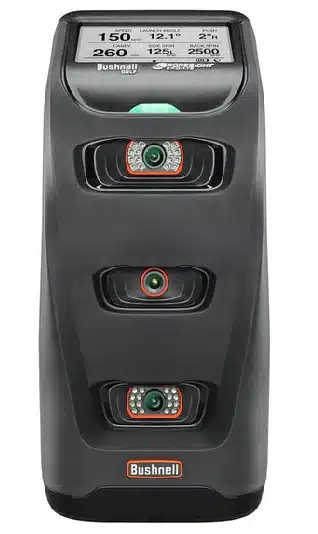
Unlock your best golf swing with the Bushnell Launch Pro. This launch monitor delivers pinpoint accuracy and detailed data to help elevate your game.
What Room Size Does the Launch Pro Need?
When you’re planning a space for your Bushnell Launch Pro, the baseline room you’ll need measures 10 feet wide by 10 feet deep with 9-foot ceilings. That’s your minimum viable setup, though you’ll definitely feel cramped. The key point is, if you want comfortable swings without worrying about clipping the ceiling or walls, bump those dimensions up to 12-13 feet wide, 12 feet deep, and keep that 9-foot height. The Launch Pro itself needs strategic placement too, sitting about 2 feet from the ball for accurate tracking. Your height matters here! Taller golfers need more ceiling clearance, while your swing length affects width requirements. Camera-based tracking works great for tighter spaces like garages, making the Launch Pro surprisingly flexible for different room configurations. If you’re adding the HomeCourse Pro 180 Retractable Screen, you’ll need a minimum clearance of 8 feet for proper installation.

Minimum Depth Requirements for Full Ball Flight
Understanding depth requirements gets tricky because the Launch Pro’s camera-based system completely changes the game compared to traditional launch monitors. You’ll need just 13 feet of depth to track full ball flight indoors, which is fantastic news for anyone with limited space. The key point is, since the photometric camera sits beside the ball and captures everything at impact, you’re not stuck waiting for extended flight tracking like radar systems demand. Those typically need 18-21 feet minimum. The official recommendation is 14 feet for basic setups, though some golfers manage with 10 feet total when they’re willing to compromise on buffer space. For home simulators, Bushnell suggests 18 feet as the sweet spot, giving you comfortable swing room plus proper screen distance without cramping your style. The optimal hitting mat should be positioned 8-12 feet from the screen to ensure accurate readings and a realistic playing experience. The Launch Pro’s portable design makes it easy to set up anywhere, weighing just 5 pounds with a built-in lithium battery for ultimate flexibility.
Width Dimensions for Different Setup Types
While depth gets most of the attention in simulator discussions, width dimensions actually make or break your setup’s usability, especially when you’re swinging a driver with authority. The key point is: you’ll need at least 6 feet of width for basic indoor tracking, though 10 feet is the comfortable sweet spot that accommodates different swing styles and body types.
Your mat choice directly impacts width requirements. The popular 5-by-5-foot Fairway mat works in tighter spaces, while the 4-by-7-foot SIGPRO mat gives you more depth without eating up width. Some retractable packages span 8 to 10.5 feet wide!
The Launch Pro device itself only measures 6 inches wide, but you’ll need that extra room for your backswing and follow-through; both right and left-handed golfers need clearance.

Ceiling Height for Safe Swings
Getting your width sorted means nothing if you’re punching holes in your ceiling with every driver swing. The point is: you need at least 9 feet of ceiling height for comfortable use with the Launch Pro. That’s your workable minimum for most golfers. Can you get away with 8.5 feet? Sure, but you’ll probably limit yourself to irons only. Bump it up to 10 feet, and you’ve got ideal conditions for full swings without worry.
Your height matters too. If you’re taller with a long, upright swing, you’ll want more than that 9-foot minimum. Shorter golfers can sometimes manage with less. The key question: can you safely swing your longest club without curtailing your backswing? If not, you need more vertical space.
Unlock your best golf swing with the Bushnell Launch Pro. This launch monitor delivers pinpoint accuracy and detailed data to help elevate your game.
Launch Pro Physical Dimensions and Placement
The Launch Pro itself is surprisingly compact; we’re talking about a unit that’s roughly the size of a large shoebox. You’re looking at 5 inches long, 6 inches wide, and 12 inches tall, measuring just 5 pounds. That means you can easily move it around or tuck it away when you’re done practicing.
Here’s the thing: placement matters more than size. You’ll need to position it on the floor, level with your ball on the mat surface. The unit requires a clear line of sight to your 7-by-10-inch hitting zone, so make sure nothing blocks its view. Plan for a 4-by-7-foot mat space total. If your mat’s up to an inch thick, you’ll need to level the unit accordingly for accurate readings. The Launch Pro connects via Wi-Fi, Ethernet, or USB-C, giving you flexibility in how you integrate it with your simulation setup.
SIG10 vs SIG12 vs Retractable Package Space Needs
Now that you know where the Launch Pro goes, you’ll need to figure out which Bushnell enclosure actually fits your space. The SIG10 needs 10’10” wide, 8’4″ tall, and 5′ deep; it’s the sweet spot for most garage setups. You’ll get a massive 10’1″ x 7’7″ screen that fills your view perfectly. The SIG12 goes even bigger for those who’ve got extra room to spare. The point is: if you’re tight on space, the retractable package drops down to 8’4″ x 8’4″ x 5′ deep with a square 7’7″ screen. All three need that same 5′ depth, but the width varies wildly. The SIG10’s 4:3 aspect ratio delivers full-screen projection that eliminates distracting white space during your rounds. The frame comes with color-coded push pin poles that make assembly straightforward even for first-timers. Add 2″-3″ buffer space around whatever you choose, and make sure your ceiling’s at least 9′ tall for comfortable swings.

Frequently Asked Questions
Can I Use the Launch Pro Outdoors Instead of Indoors?
Yes, you can absolutely use the Launch Pro outdoors! You’ll actually eliminate all those annoying indoor space requirements, no more worrying about the 10-foot width minimum, 10-13 foot depth needs, or ceiling height restrictions. The device runs on battery power for 5-7 hours, so you’re completely cordless. Just take it to your yard, a driving range, or even out on the course to collect data during actual play.
Does the Launch Pro Require a Permanent Installation or Is It Portable?
The Launch Pro is completely portable, no permanent installation needed! You’re looking at a compact unit that’s 12 inches tall and weighs just 5 pounds, so you can easily move it between your garage, basement, or indoor range. It sits beside the ball without requiring any mounting hardware or fixed setup. Just connect via Wi-Fi, Ethernet, or USB-C, and you’re ready to practice wherever you want!
Will the Launch Pro Work in a Garage With Concrete Floors?
Yes, the Launch Pro works great on concrete garage floors! You’ll want a quality hitting mat like the SIGPRO Turf, which fits seamlessly into your garage floor, or the Super Softy and Teeline mats that use a heavy rubber base. These mats give you solid stability for proper swing mechanics while protecting your concrete from damage. The Launch Pro’s photometric technology actually works better indoors than outdoors, making your garage setup ideal for accurate readings.
Can I Move the Launch Pro Between Rooms Easily for Storage?
You’ll have no problem moving the Launch Pro between storage rooms. At just 5 pounds and measuring 5 by 6 by 12 inches, it’s compact enough to carry with one hand. The built-in battery means you don’t need to worry about unplugging power cords constantly. You can grab it, walk to another room, and set it up in seconds, perfect for keeping it out of the way when you’re not practicing.
Does Room Lighting Affect Launch Pro Accuracy and Performance?
Room lighting won’t mess with your Launch Pro’s accuracy at all. The camera system uses infrared technology that handles different lighting conditions like a champ, whether you’re in a bright garage or dimly lit basement. Unlike radar systems that can struggle with lighting variations, the Launch Pro delivers consistent ball speed, launch angle, and spin readings regardless of your room’s brightness. You can practice anytime without worrying about flipping lights on or off!
Conclusion: Bushnell Launch Pro Space Requirements
You’ve got the specs, you’ve measured your space, and now you can figure out if the Launch Pro will actually fit in your room. Remember, you’ll need at least 15-18 feet of depth, 10-12 feet of width, and 9-10 feet of ceiling height for comfortable swings. Don’t forget to factor in the unit itself and your hitting position! Measure twice, order once. Your golf simulator dream depends on getting these numbers right.

About the author
Paul Liberatore
Paul Liberatore is the founder of Golfers Authority and a former four-year golf gear contributor to Sports Illustrated. He tests golf equipment hands-on to help golfers make better buying decisions.