
The Uneekor EYE XO2 is a $10,999 overhead launch monitor built for a permanent indoor simulator. Its strongest case is the 28-inch by 21-inch hitting zone, three-camera tracking, and 24 ball and club data points. The available evidence supports stable ball data and a useful overhead workflow, but it does not support a precise TrackMan accuracy claim.
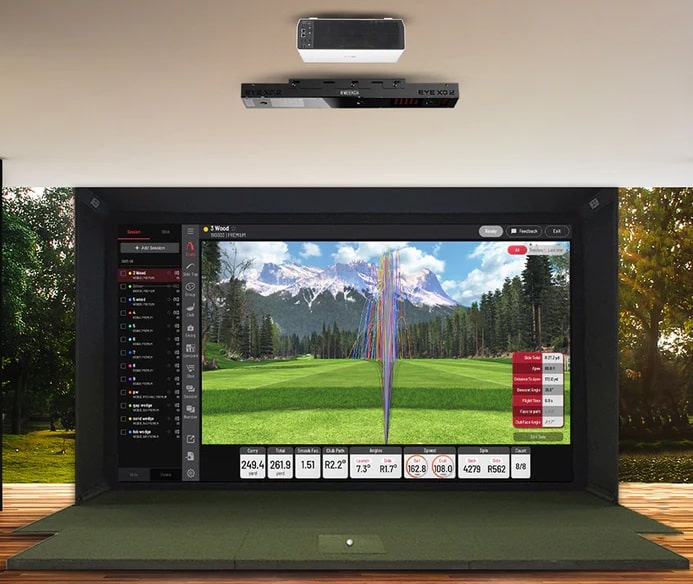
The 28-inch by 21-inch hitting zone is the practical reason to consider the EYE XO2. It gives right- and left-handed golfers room to address the ball without moving a floor unit, which matters in a shared home studio, teaching bay, or commercial simulator.
Quick Overview
- The EYE XO2 uses three high-speed infrared cameras and reports 24 ball and club data points, but Uneekor does not publish a numeric accuracy tolerance.
- Overhead mounting provides a 28″ x 21″ hitting area, eliminating alignment issues and accommodating multiple players without repositioning.
- Dimple Optix technology works with any golf ball, eliminating the need for marked balls and saving ongoing costs.
- At $10,999 plus the cost of a suitable gaming PC and simulator room, it is built for serious golfers with dedicated indoor spaces.
- With reflective club stickers applied, the system reports vertical and horizontal impact location alongside its club and ball data; no millimeter tolerance is published.

The Uneekor Eye XO2 launch monitor sets the gold standard in golf tech with unmatched precision and real-time data. Ideal for players seeking pro-level feedback and immersive simulator experiences, this review dives deep into its features, accuracy, and performance benefits. Whether you're refining your swing or elevating your indoor golf game, the Eye XO2 delivers exceptional value.
Three Cameras See What Others Miss
The EYE XO2 uses three high-speed infrared cameras to capture the ball and club through impact. Uneekor lists 24 outputs, including speed, spin, launch, carry, club path, face angle, attack angle, dynamic loft, lie angle, and impact point. The third camera and larger zone expand on the original Uneekor EYE XO. That gives you ball flight, club delivery, and strike location in one view. But the current manual does not publish a frames-per-second figure or an accuracy tolerance, so the camera count should not be turned into a made-up performance number.
Published hands-on testing describes the ball data as stable from session to session. The same evidence is more cautious about club data, placing it below GCQuad and TrackMan iO rather than claiming exact parity. Here’s the thing. Stable ball data is the part most simulator golfers will notice on every shot. Club data is where a coach or serious player needs to compare the number to the impact replay instead of trusting the logo on the sensor. The EYE XO2 is useful without pretending every output has been independently certified.
The impact replay can show toe, heel, high, and low contact while the data panel reports the resulting ball flight. That is useful evidence during practice because you can connect the strike to the shot instead of guessing. What the published record does not provide is a controlled TrackMan 4 comparison within 0.2 mph or 50 rpm, so those tolerances should not be treated as verified. If reference-unit parity is your deciding factor, ask for a documented comparison before spending $10,999.
No More Marked Balls, No More Hassle
Dimple Optix works with normal golf balls, so there is no printed pattern to align before each shot. That makes the EYE XO2 easier to share and lets you practice with the ball you normally play. You can switch from a driver ball-speed session to wedge work without rotating a pattern toward the camera. It also avoids tying the whole simulator to one special-ball system. That matters during group sessions. This marker-free ball tracking is one reason the EYE XO2 belongs among the best launch monitors for a permanent indoor setup.
There is one important distinction. You do not need marked balls, but you do need Uneekor’s reflective bar and dot stickers for full club tracking. The box includes 400 stickers, and the manual uses different placement instructions for drivers, fairway woods, hybrids, and irons. Golfers who only care about ball flight can skip that step. Golfers buying the EYE XO2 for face, path, delivery, and strike-location feedback cannot. In other words, it is marker-free for the ball, not sticker-free for the club.
The reliable claim is convenience, not a guaranteed 100-rpm tolerance. Uneekor allows any standard ball, while the cameras and software supply the measured spin and flight data. Honestly, that is plenty valuable without inventing a lab result. Dirty or damaged balls can still make optical tracking harder, and reflective clubfaces can cause trouble with club reads. Clean equipment, correct stickers, and proper calibration remain part of the setup if you want the best data.
Club Data That Actually Improves Your Swing
Club Optix pairs the impact image with club path, face angle, attack angle, lie angle, dynamic loft, and vertical and horizontal impact location. That combination helps explain why a shot started or curved a certain way. Face angle helps explain the starting direction. Path and face to path help explain the curve. Impact location tells you whether contact helped or hurt the result. The value is seeing contact and delivery together, not attaching an unsupported distance loss to one swing.
The impact-location display can reveal repeated high, low, toe, or heel contact across a session. That gives you a specific pattern to work on instead of another generic swing tip. If the same miss keeps showing up, you can change one thing and watch whether the pattern moves. That can guide focused practice, but the EYE XO2 does not guarantee a particular distance gain and Uneekor does not publish a millimeter accuracy tolerance for the virtual clubface.
The useful workflow is to compare the impact replay, the club-delivery numbers, and the ball flight after the same shot. If those three agree, the feedback is easier to act on. If they do not, check mounting, calibration, lighting, and sticker placement before treating one number as definitive. High-loft wedges and reflective faces are possible trouble spots. That does not prove a widespread defect, but it tells you where to look if the data and the video disagree. You can also use the session history to see whether a change holds across more than one shot.
Software That Grows With Your Game
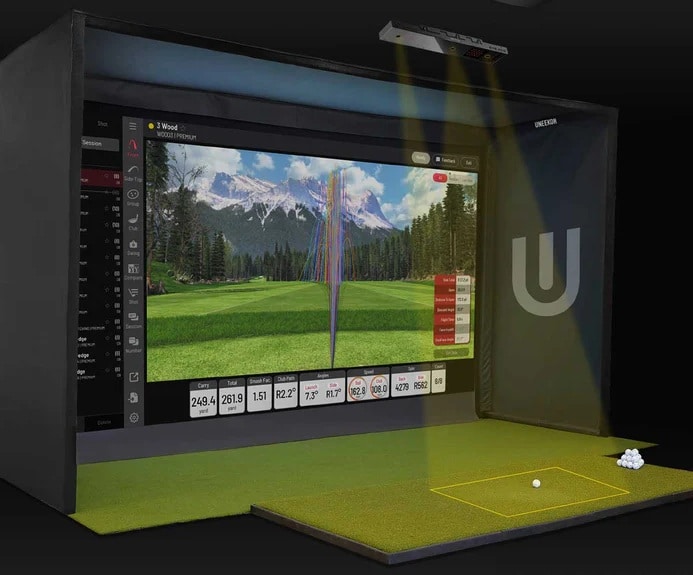
The free Player package covers the core practice experience: ball data, club data, a virtual driving range, 100 Power U reports, and one profile. Power U reports save session data and video so you can review a pattern instead of relying on memory. That means the EYE XO2 can function as a serious practice tool without a required annual software payment. Basic is not bad here. If one golfer is using the unit for structured range work, Player covers the job. Start there, learn what you actually use, and only then decide whether another profile, more reports, or third-party course access earns the annual fee.
Want feedback on the swing itself rather than just the ball? I covered Uneekor’s camera add-on that tracks 60-plus checkpoints in my Uneekor AI Trainer review.
The current bundle includes a three-month Ultimate trial and one year of AI Trainer. After that, Pro costs $199 per year, Champion costs $399, and Ultimate costs $599. Pro moves you to five profiles, 500 Power U reports, third-party software, and five Refine courses. Champion expands to 50 profiles, 1,000 reports, 20 Refine+ courses, and AI Trainer. Ultimate raises the profile limit to 100 and adds GameDay. Pick the tier for the software you will actually use, not because the most expensive column looks complete.
The EYE XO2 supports GSPro, E6 Connect, and TGC 2019 through Uneekor’s paid software tiers. Third-party access starts with Pro at $199 per year. That is the catch for golfers buying mainly to play simulator rounds. The hardware works on Player for free, but your preferred course software may add both an Uneekor plan and its own license. Performance also depends on the gaming PC, network, software configuration, and simulator application.
Installation Reality Check
Installation requires planning. The manual lists the sensor at 5.8 pounds and the bracket at 2.3 pounds. It places the sensor 9 to 10 feet above the floor and 3 feet 6 inches ahead of the tee. Uneekor’s current room guidance recommends a 10-foot ceiling. The current PC recommendation includes 32 GB of RAM and an NVIDIA RTX 3060 Ti or equivalent when you are running Swing Optix and AI Trainer. This is a room-and-computer project, not just a $10,999 sensor purchase.
The package includes the mounting bracket, level, calibration board, power hardware, USB Ethernet adapter, and a 60-foot CAT6 cable. The sensor needs exact alignment and a wired PC connection. You also need secure ceiling structure in the correct location in addition to enough height. The job is manageable, but it is not a portable unit or a quick floor-level setup. If the sensor is mounted outside the specified position, Uneekor warns that accuracy can suffer. Measure the room, locate the ceiling structure, and plan the cable run before the box arrives. That preparation can save you a ton of installation frustration.
The current recommended room size is 13 feet wide, 16 feet deep, and 10 feet high. That gives both the sensor and the golfer appropriate clearance. Measure from the finished mat surface, account for the player’s swing, and confirm the sensor position before purchasing. If you cannot meet those numbers, do not try to force the EYE XO2 into the room. A floor unit or a smaller overhead model is the smarter buy, even if the flagship has the longer feature list.
The Uneekor Eye XO2 launch monitor sets the gold standard in golf tech with unmatched precision and real-time data. Ideal for players seeking pro-level feedback and immersive simulator experiences, this review dives deep into its features, accuracy, and performance benefits. Whether you're refining your swing or elevating your indoor golf game, the Eye XO2 delivers exceptional value.
- Extremely accurate data
- Real-time shot feedback
- Works indoors/outdoors
- Expensive
- Needs space to set up
- Slight learning curve
Frequently Asked Questions
What Is the Warranty Period for the Uneekor Eye XO2?
The current EYE XO2 AI Studio includes a two-year warranty. Uneekor also provides a Limited Strike Warranty for new EYE XO and EYE XO2 sensor units, covering the lesser of two years from delivery or two ball-strike occurrences. Warranty coverage requires purchase from Uneekor or an authorized reseller.
Can the Eye XO2 Be Used Outdoors?
No, you can’t use the Eye XO2 outdoors. It’s strictly designed for indoor use only. You’ll need to mount it overhead to a ceiling about 9-10 feet high, and it requires constant plug-in power plus a hardwired ethernet connection to your PC. The high-speed infrared cameras won’t work properly outdoors due to sunlight interference, and environmental factors like wind and variable lighting will corrupt your data readings.
Does the Eye XO2 Work With Left-Handed Golfers?
Yes, you’ll find the Eye XO2 works perfectly with left-handed golfers. You won’t need any hardware modifications or repositioning when switching between right and left-handed players. The ceiling-mounted design tracks from overhead, so you can seamlessly alternate between handedness. The system’s expanded 28″ x 21″ hitting zone gives you plenty of room for left-handed swings, and the software automatically captures all the same performance metrics regardless of which side you’re swinging from.
What Are the Minimum Ceiling Height Requirements for Installation?
You’ll need a ceiling height of 9 to 10 feet for proper EYE XO2 installation. The sensor mounts overhead about 3.5 feet in front of your tee area, and anything below 9 feet risks club strikes during your follow-through. Don’t forget to account for mat thickness – even an inch of flooring reduces your effective clearance. If you’re close to 9 feet, consider mounting higher within the recommended range for extra safety.
Is Professional Installation Required or Can I Self-Install?
You can self-install the Eye XO2 without professional help. The mounting process requires basic tools and careful attention to alignment specifications (3’6″ from tee, 9-10′ ceiling height). Software installation involves downloading the Uneekor Launcher and following simple prompts. You’ll only need an electrician if your existing outlet isn’t compatible. Uneekor provides detailed manuals and video walkthroughs that make the entire setup process manageable for users with basic technical skills.
Final Thoughts: Uneekor EYE XO2 Launch Monitor Review
The Uneekor EYE XO2 makes sense for a serious golfer, coach, or simulator operator who will use its 28-inch by 21-inch zone, 24 data points, impact replay, and Trouble Mats. It costs $10,999 and still needs a suitable gaming PC and room. Buyers who do not need that large shared zone should compare the $5,999 EYE XR or the more affordable Uneekor EYE MINI LITE.
Can’t decide between the two generations? My EYE XO vs XO2 comparison shows the XO2 adds a third camera and a much bigger hitting zone while data accuracy stays the same.
This is not a casual garage upgrade. It is a permanent premium system for buyers who value a large overhead hitting zone, deep club and ball data, and Uneekor’s software ecosystem more than portability or the lowest price. The evidence supports that narrower recommendation without claiming a laboratory result that was never documented.

About the author
Paul Liberatore
Paul Liberatore is the founder of Golfers Authority and a former four-year golf gear contributor to Sports Illustrated. He tests golf equipment hands-on to help golfers make better buying decisions.