
The Foresight GCHawk Launch Monitor bolts to your ceiling and watches the ball with four cameras, and for a permanent home simulator bay, that’s a great way to get the monitor off your floor. If you want a launch monitor you can throw in the car and take to the range, this isn’t it.
Is the Foresight GCHawk Launch Monitor worth buying?
Now, here’s the pitch. Foresight took the four-camera tracking it’s known for and hung it over your head. No unit on the mat, no lining anything up before you hit, and you’re not going to kick it across the room.
So I’m going to walk you through what that overhead setup actually changes, what’s in the box behind my buy button, what costs extra, the catch, and who should buy it. If you’re still deciding between overhead and floor units in general, start with my breakdown of overhead golf launch monitors.
Quick Overview
- It mounts to your ceiling and tracks with four cameras, so there’s no box sitting next to your ball.
- Foresight’s setup guide covers a left-handed and a right-handed hitting zone, so a lefty and a righty can share the bay.
- Ball data comes standard. Club data is a paid add-on, and it needs Foresight-approved markers on your clubfaces.
- The package I link to comes with Foresight’s FSX software and 10 courses. Other packages are put together differently.
- It works with Foresight’s MyBag setup, so a compatible Bushnell rangefinder can use your simulator numbers on the course.

Unlock your best game with the Foresight GCHawk launch monitor. Packed with cutting-edge tech, it delivers precise data to sharpen every swing. Perfect for serious golfers aiming for pro-level insights and improved performance on the course.
- Accurate ball and club data
- Portable and easy to set up
- Detailed swing metrics
- Expensive for casual users
- Needs lots of space
- Limited app integrations
Foresight GCHawk Specs
The Foresight GCHawk is a ceiling-mounted, four-camera launch monitor built for a permanent simulator room, and it needs a pro install.
| Spec | Foresight GCHawk Launch Monitor |
|---|---|
| Mounting | Ceiling, permanent install |
| Cameras | Four (Quadrascopic) |
| Hitting area | 52 x 30 inches (1,560 square inches) |
| Ball data | Launch angle, side angle, ball speed, total spin, back spin, side spin, spin axis |
| Club data (paid add-on, marked clubs) | Club speed, club path, attack angle, loft, lie, face angle, closure rate, impact location |
| Unit size (setup guide) | 89.117 in long, 7.561 in wide, 6.081 in high |
| Weight | 36 lb per Foresight’s setup guide (its comparison chart rounds to 35 lb); the mount is another 4 lb |
| Connections | Ethernet, USB-C, Wi-Fi |
| Install | At least two qualified, licensed installers; ceiling screws not included |
| Calibration | Foresight calibration tool and wand, run from a PC |
| Handedness | Left- and right-handed hitting zones |
| Warranty | Two-year limited |
Four Cameras Overhead Means There’s No Box on Your Hitting Mat
The whole reason you buy the GCHawk is where it lives. It’s up on the ceiling, pointed down at the ball, with Foresight’s Quadrascopic four-camera setup.
So your hitting area stays clear. You set the ball down and hit. You’re not checking whether a box on the floor got bumped, and you’re not worried about a bad swing catching it.
Foresight lists a 52 x 30 inch hitting area. That’s the area where the ball can sit, and it’s a big target to work inside of. Just don’t read it as a promise of full club data from any spot in that space.
And if your house has a lefty in it, this matters. Foresight’s setup guide covers both a left- and right-handed hitting zone. So when your buddy who hits from the other side shows up, there’s no monitor to drag across the room.
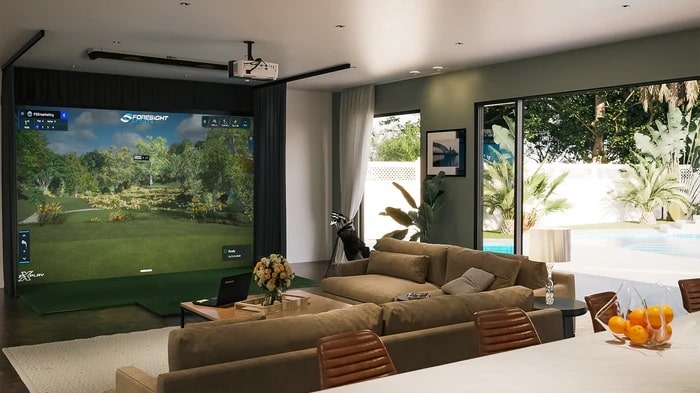
On the ball side, you get launch angle, side angle, ball speed, total spin, back spin, side spin and spin axis. That’s the stuff that tells you why your ball curved, not just where it ended up. If you’re working on a slice or trying to flatten out a ballooning wedge, those are the numbers you’ll actually stare at.
The Club Data Is Deep, but You Pay for It and Mark Your Clubs
Now, the club side of the list is the good stuff: club speed, club path, attack angle, loft, lie, face angle, closure rate and impact location. If you’re chasing why your driver starts left and turns right, path and face are the two you want.
But here’s the thing. Club data on the GCHawk is a paid add-on. Foresight activates it for your device’s serial number through its server, and the listing I link to calls it an additional purchase.
And it doesn’t work with bare clubs. Foresight says you need its approved club-face markers on the club and club mode turned on to capture club data. So plan on marking each club you want numbers for.
If you just want to hit balls and play courses, you can skip it. If you’re working on your swing, budget for it from day one, because the ball numbers by themselves won’t tell you what the club did.
The Package You Buy Decides Which Software and Extras You Get
This is the one people get wrong. The GCHawk doesn’t come with one fixed bundle. What’s in the box depends on who’s selling it.
The 2nd Swing listing behind my buy button includes FSX Play, FSX 2020, FSX Pro Performance, the Performance App and Fairgrounds, with 10 courses. Another retailer’s package lists 25 courses and throws in a Bushnell Pro X3+LINK rangefinder. Same monitor, different box.
So before you buy, read the package list, not the headline. If you want more courses down the road, read how buying extra FSX courses works.
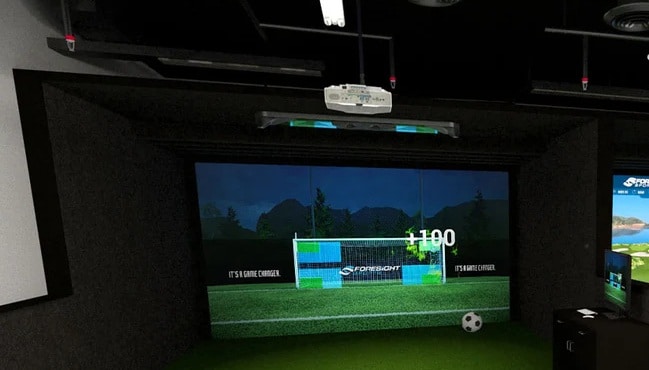
There’s also a multisport side. Foresight’s own comparison chart lists multisport as a yes for the GCHawk and a no for the Falcon. What it doesn’t tell you is which games come with your package. If the kids want to kick a soccer ball at the screen, confirm that game is in your bundle before you promise them anything.
LINK Puts Your Simulator Numbers on a Bushnell Rangefinder
I said it about Bushnell’s LINK rangefinders: the feature is useless unless you already own a compatible Bushnell or Foresight launch monitor. Well, the GCHawk is one of those launch monitors. It’s on Foresight’s MyBag list of compatible devices.
The setup goes like this. You build an assessment in the Foresight App, link your Bushnell Golf App account, and register a qualifying Pro X3-series rangefinder. That’s the route Foresight lays out for getting your MyBag numbers onto the rangefinder.
So if you already own one of those rangefinders, or you were going to buy one anyway, LINK is a nice bonus for a GCHawk owner. If you don’t, it’s not a reason to buy this monitor. And remember, the package I link to doesn’t list a rangefinder.
What I Don’t Love
Here’s the catch. This is a construction project, not a gadget.
Foresight wants at least two qualified, licensed installers and a ceiling that can actually carry it. The ceiling screws aren’t in the box, and the installer has to follow Foresight’s full manual. So if you rent, or you were hoping to set it up on a Saturday with a drill and a ladder, it’s not for you.
Then there’s calibration. Foresight’s process uses its own calibration tool and wand, run from a PC. With internet, the math happens in the cloud. Without it, there’s a manual process where you send support files. It’s not plug and play either.
And you need to measure your room before anything else. Ceiling height, hitting area and screen distance all have to work together, which is one of the mistakes to avoid when buying a golf launch monitor.
But if you’ve got a dedicated room and you’re paying a pro to build it out anyway, none of that is a dealbreaker. It’s the price of getting the monitor off the floor.
Unlock your best game with the Foresight GCHawk launch monitor. Packed with cutting-edge tech, it delivers precise data to sharpen every swing. Perfect for serious golfers aiming for pro-level insights and improved performance on the course.
- Accurate ball and club data
- Portable and easy to set up
- Detailed swing metrics
- Expensive for casual users
- Needs lots of space
- Limited app integrations
Who It’s For
Buy it if:
- You’re building a dedicated simulator room and want the monitor up and out of the way.
- A lefty and a righty are going to share the same bay.
- You’re willing to pay for club data and put markers on your clubs.
- You already use a LINK rangefinder or plan to, and want your sim numbers on the course.
Skip it if:
- You rent, or your ceiling can’t take a permanent install.
- You want a launch monitor you can take to the range.
- You want to set it up yourself this weekend.
Frequently Asked Questions
How high does my ceiling need to be for the Foresight GCHawk?
Retailer listings put the mounting distance at 9.5 to 10.5 feet off the turf. Foresight’s own layout is a diagram, so have your installer confirm the exact height for your room before you buy.
Is the Foresight GCHawk the same as the Falcon?
No. Foresight’s old GCHawk page now sends you to the Falcon page, and Foresight calls the Falcon the next generation. But they’re different units, and Foresight’s comparison chart lists multisport for the GCHawk and not the Falcon. GCHawk support pages are still up. If you’re cross-shopping the two, read my Foresight Falcon review.
Does the Foresight GCHawk come with a rangefinder?
It depends on the package. The 2nd Swing package I link to doesn’t list one. Another retailer’s bundle includes a Bushnell Pro X3+LINK. Check the package list before you order.
What does the Foresight GCHawk warranty cover?
It’s a two-year limited warranty from the original purchase date on covered hardware, and you need your dated receipt. Foresight’s warranty card excludes power adapters, cables, accessories, software, installation and damage. So don’t count on it for a fried cable or a bad install.
Can a left-handed golfer use the Foresight GCHawk?
Yes. The setup guide covers both sides of the ball, and the monitor stays put on the ceiling whichever side you hit from.
Final Thoughts: Foresight GCHawk Launch Monitor Review
So here’s the decision. If you’re putting in a real simulator room, with a solid ceiling and a pro doing the install, the Foresight GCHawk Launch Monitor gets the tech off your floor for good. Read the package list, decide on club data up front, and grab it through the box above.
If you need something you can pack up, or you can’t drill into the ceiling, keep shopping. A floor unit will serve you better.

About the author
Paul Liberatore
Paul Liberatore is the founder of Golfers Authority and a former three-year golf gear contributor to Sports Illustrated. He tests golf equipment hands-on to help golfers make better buying decisions.