
The professional end of this market comes down to FlightScope’s X3 family against TrackMan 4, and the first thing to settle is which FlightScope you mean, because the original X3 and the newer X3C are separate units with their own manuals. I’m not picking an accuracy winner between these units in this comparison. What I can put side by side is what each company publishes about setup space, indoor ball handling, data coverage and ongoing cost, and that is what actually decides whether one of these works in your bay.

Use Code GAMevo to get 5% off
Unlock your best swing with the Flightscope X3C launch monitor. Precision tracking and instant feedback help golfers elevate their game like never before.
| Feature | FlightScope X3 | FlightScope X3C | TrackMan 4 |
| Technology | Fusion Tracking: tracking radar plus image processing; boresight camera | Fusion Tracking: tracking radar plus image processing; boresight camera | Two synchronized Doppler radars plus radar-synchronized high-speed optics (OERT) |
| Sensor placement | 9 to 14 ft behind the tee for normal shots; 5 ft for short game (this manual revision) | 9 to 14 ft behind the tee for normal shots; 5 ft for short game (manual). Separate FAQ: 8 to 10 ft behind the tee | Behind the golfer on the target line |
| Indoor distance figure | Indoor: ball flight at least 13 ft; Short Indoor: more than 8 ft, under 13 ft | Limited flight: ball flight 8 ft or more, under 44 yd | Minimum 4.7 m / 16 ft from unit to net |
| Indoor ball marking | One metallic sticker required in Indoor and Short Indoor; not for chipping or putting | One sticker required in Limited flight mode; not for chipping or putting | No marked balls required |
| Data breadth | Not published | 50+ parameters claimed in launch release; not stated in manual | More than 40 parameters (manufacturer marketing) |
| Display | None on unit for data; LED indicators; data on PC or tablet | None on unit for data; LED indicators | No built-in consumer display |
| Connectivity | Wi-Fi 802.11b/g via USB adapter; Ethernet to PC; USB 2.0 | Manual: Wi-Fi 802.11b/g, Ethernet, USB 2.0; launch release: 5 GHz hotspot (unresolved) | Dual-band Wi-Fi (2.4 + 5 GHz), Micro-USB, Ethernet |
| Battery | 7.4 V 13500 mAh lithium-ion, not user replaceable; 8 to 10 hour charge; run time not specified | 7.4 V 13500 mAh lithium-ion, not user replaceable; 8 to 10 hour charge; run time not specified | Lithium-ion 10,400 mAh; 4+ hours playtime |
| Size and weight | 305 x 255 x 48 mm; 3.05 kg +/-10 g | 307 x 263 x 49 mm; 3 kg | 300 x 300 x 45 mm; 6.6 lb / 3.0 kg on TrackMan spec page (retailer copy lists 6.2 lb / 2.8 kg) |
| Putting and chipping | Putting and Chipping modes | Putting and Chipping modes | Short-range radar handles putting, club and impact data |
| Software and subscription | Not published | No subscription fees stated in a dated promotional demo article; current terms unknown | First year of premium software included; yearly fee after |

Unlock your full golfing potential with the TrackMan launch monitor, the gold standard in precision technology, trusted by top pros for game-changing insights.
What are you actually choosing between here?
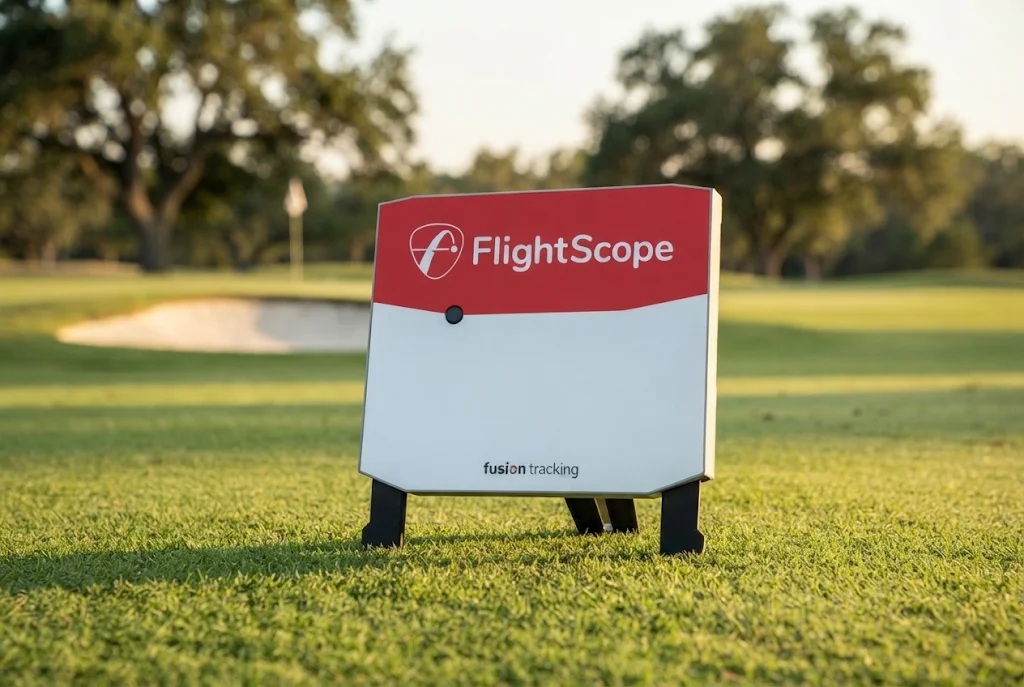
You’re choosing between two different measurement designs that happen to live in similar looking boxes. The FlightScope X3 and X3C are both portable, battery powered units that sit on the floor behind the hitting position. Neither shows data on the unit itself. You get an interface and status lights, and the numbers land on a tablet or PC over Wi-Fi, or on a PC over Ethernet. FlightScope calls its method Fusion Tracking and describes it as tracking radar combined with image processing, with a built-in boresight camera used for the data fusion and for the on-screen alignment check.
TrackMan 4 is the portable indoor and outdoor unit in that lineup, and it is not the same product as TrackMan iO, which is a ceiling mounted indoor unit. Do not shop them as one thing. TrackMan 4 combines two synchronized Doppler radars with radar synchronized high speed optics, a system TrackMan calls OERT, with a short range radar handling club, impact and putting and a long range radar tracking ball flight.
On data breadth, each brand counts its own way. TrackMan advertises 40 plus parameters with published breakouts for full swing club and ball, putting and green data. FlightScope’s January 2025 X3C launch release advertises more than 50 parameters plus Face Impact Location and an Environmental Optimizer. The X3’s manual doesn’t print a count. Two vendor counts built on different definitions are not a scoreboard, so read the actual field lists against the fitting or teaching work you do.

Buy the FlightScope X3 Golf Launch Monitor for unmatched tour-level accuracy. Experience Fusion Tracking technology and 50+ data metrics. Order yours today!
How much room does each one need?
They publish different kinds of numbers, which is why so much bad space advice floats around. FlightScope publishes two separate measurements and you have to keep them apart. One is where the sensor sits relative to the tee. The other is how much ball flight a given mode needs.
In X3 manual revision E19-D2154-Iss6, the sensor goes 9 ft to 14 ft behind the tee for normal shots and 5 ft for putts and chips, and the mode windows are separate: Indoor wants at least 13 ft of flight, Short Indoor more than 8 ft but less than 13 ft. X3C revision E19-QB344-ISS1.1 keeps that placement and swaps those two windows for one Limited flight mode of 8 ft or more and less than 44 yd. FlightScope’s FAQ separately gives 8 to 10 ft behind the tee with at least 8 ft of flight, which is not the manual range.
TrackMan publishes one indoor figure, 4.7 m or 16 ft, and it is measured from the unit to the net. That is a unit to net total, not the space behind the golfer, and it is not a room minimum. Neither is any FlightScope figure. If you’re building or retrofitting a bay, measure your hitting position to the net and the net back to where a floor unit would sit, then check both against the exact revision and mode for the model you’re being quoted.

Do you need stickers or special balls for indoor spin?
FlightScope makes a ball marker a requirement inside its restricted flight modes, and TrackMan doesn’t require one but recommends a specific ball indoors. This is the sharpest day to day difference between the two brands.
The X3 manual states that the supplied metallic stickers must be used with Indoor and Short Indoor modes, one per ball with the dot facing the target, that spin and carry may be inaccurate with unmarked balls in those modes, and that marked balls must not be used for chipping and putting. So you prepare balls for full swing work and swap to clean ones for the short game. The X3C carries the same requirement in Limited flight mode, with a Titleist RCT ball offered in FlightScope’s FAQ as the alternative.
TrackMan’s support documentation from June 2025 says TM4 supports virtually all golf balls, and its explainer FAQ says TM4 data does not require markers or stickers. Separately, TrackMan highly recommends the Titleist RCT ball for the most accurate indoor tracking and more consistent spin in confined spaces. So RCT is a recommendation for indoor spin rather than a blanket requirement, and I wouldn’t assume ordinary balls match it indoors. Price out the consumable you’d actually live with.
Is the X3C worth it over the original X3?
The honest differences are the mode structure, the body and processor claims, and the fact that the X3C has a dated price and a stated launch software package on record. The marketing framing is lighter and more portable, and the printed specifications don’t support that framing. The X3 manual states 3.05 kg plus or minus 10 g at 305 by 255 by 48 mm. The X3C manual states 3 kg at 307 by 263 by 49 mm, marginally lighter on paper and slightly larger in all three dimensions, with different rounding conventions between the two documents. If someone sells you the carbon fibre body on weight savings, ask to see both printed masses.
What is documented as genuinely different is the carbon fibre body, a quad core 64 bit processor and the simplified two mode play structure, the first two being FlightScope’s own 2025 launch claims rather than manual lines. Two things to pin down in writing: the manual lists Wi-Fi 802.11b/g while the January 22, 2025 launch release markets a 5 GHz hotspot, and that release’s E6 Connect for iOS and PC with 12 courses is the launch date package. A free FlightScope app doesn’t make third party simulator licences free.
If you already own an X3, I don’t see a documented reason to upgrade for the hardware refresh alone. My original X3 and SkyTrak ST+ video shows the original X3 in a bay beside a different unit, not X3C or TrackMan 4, and not a controlled pair test. For either brand’s numbers, see FlightScope data explained and the FlightScope X3C writeup.
What does ownership cost on each side?
Every number here is dated, so get a current quote before you budget. For TrackMan 4, a $25,995 US list price and $1,100 per year for software after an included first year were recorded on October 7, 2026. For the X3C, $14,995 was displayed in its January 22, 2025 launch release. Different dates, not offers today, and I won’t run gap math between them. No FlightScope release in hand puts a price on the original X3.
On recurring cost, the only no subscription statement for the X3C comes from a February 2025 manufacturer hosted demonstration article, which is promotional, was presented alongside a FlightScope reseller and affiliate representative, and says nothing about third party simulator licences. Treat current terms as something to confirm, not something you already know.
The structural ownership facts matter more than the headline price. Both FlightScope manuals describe a battery that is not user replaceable, is serviced only at a FlightScope Repair Center and takes 8 to 10 hours to charge. If you travel to fittings, get the run time, warranty term and current software terms for your exact unit confirmed in writing first. For the camera based side of the market, see TrackMan vs Foresight.

Frequently Asked Questions
Which is more accurate, a FlightScope X3 or X3C or a TrackMan 4?
I’m not naming a winner in this comparison, because what I’m working from is what each brand publishes about setup, data coverage and ball handling rather than a measurement result. If accuracy proof is your deciding factor, ask each company for its own accuracy figures for the exact model and revision you’re being quoted, and ask what test conditions those figures apply to. Then decide on documentation, setup fit, ball workflow and software path.
How far behind the ball does a FlightScope X3 or X3C sit?
Both manual revisions cited here put the sensor 9 ft to 14 ft behind the tee for normal golf shots and 5 ft for putts and chips, with a tip to tee up within 6 inches of the specified position. FlightScope’s FAQ separately recommends 8 to 10 ft behind the tee with at least 8 ft of ball flight. Those are different pieces of guidance for different purposes, so confirm which one applies to your model, revision and app version.
Does a TrackMan 4 require a Titleist RCT ball?
No. TrackMan states that TM4 supports virtually all golf balls and that TM4 data does not require markers or stickers. TrackMan does highly recommend the Titleist RCT ball for the most accurate indoor tracking and more consistent spin in confined spaces, and its indoor guidance tells TM4 users to use RCT. That is a recommendation for indoor spin capture, not a universal requirement, and standard balls shouldn’t be assumed to match RCT indoors.
Is TrackMan iO the same thing as TrackMan 4?
No, and this trips up a lot of buyers. TrackMan 4 is the portable indoor and outdoor unit that sits on the floor behind you. TrackMan iO is a separate ceiling mounted indoor product. Their setup requirements and indoor ball guidance are not the same, so specifications and advice for one do not transfer to the other.
Can the X3 and X3C measure putting and chipping?
Yes. Both manuals print separate Putting and Chipping modes with a 5 ft sensor placement distance, and both describe chipping and putting data synced with customizable video recording. The catch is the ball rule, because marked balls must not be used for short game work, so you’ll be swapping balls when you move between full swings and the short game indoors.
Conclusion: FlightScope vs TrackMan
Buy TrackMan 4 if you want dual radar and synchronized optics inside one integrated platform, with parameters broken out by shot type, a 12 month hardware warranty in its general purchase terms and a stated annual software cost to budget against. The indoor workflow is part of the draw, since TrackMan doesn’t require a marker on the ball, though it recommends RCT for indoor spin. You also need to clear 16 ft from the unit to your net, so measure first.
Go FlightScope X3C if you want the current flagship of that family, you want putting and chipping measurement in the same portable unit, and your bay is tight on ball flight, where the single Limited flight window starting at 8 ft and the 5 ft short game placement are the practical draws. Keep the original X3 if you already own one, because the documented changes are the body material, the processor claim and the simplified mode structure, and none of that is an upgrade trigger on its own. Either way, confirm the battery run time, the warranty term and the current software and subscription terms for the exact unit before you sign.
Skip this tier entirely if you’re putting a simulator in the garage for fun. These are built for coaches, fitters, retailers and equipment testers who use the measurement work every week and can get real answers out of a sales rep, and a recreational hitting bay doesn’t need the setup discipline or the spend. If you are in that professional group, the three questions I’d make a rep answer in writing are what the battery actually runs for, what the software costs going forward, and what the warranty covers and for how long.

About the author
Paul Liberatore
Paul Liberatore is the founder of Golfers Authority and a former three-year golf gear contributor to Sports Illustrated. He tests golf equipment hands-on to help golfers make better buying decisions.