
The Swing Caddie SC200 Plus is the simplest launch monitor I know of. No app, no phone, no subscription. Just numbers on a screen, and it calls your carry out loud after every swing. If that’s all you want, it’s a great option. If you want spin, launch angle or a shot history, it’s not your launch monitor.
It lists at $179.99, and it’s $79.99 with code PAUL, which my link applies for you.
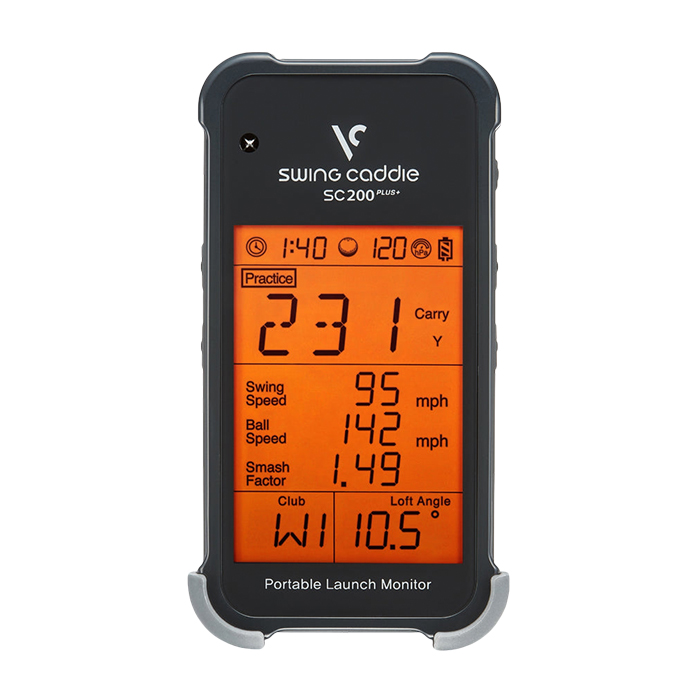
Experience precision golf training with the Swing Caddie SC200 Plus, advanced Doppler radar, voice output, and swing speed mode for ultimate practice.
- Voice calls out your carry
- Remote comes in the box
- Affordable price
- Fewer advanced metrics
- No session history
What the SC200 Plus Actually Does
It’s a Doppler radar unit, and it gives you four things: carry and total distance, swing speed, ball speed and smash factor. They show up on a bright LCD you can read in the sun, and the screen is about 4 inches. There’s no pairing and no account. You put in the batteries and turn it on.
There are two things about it that make it different on the range, and neither one shows up on a spec sheet. The first is the remote. I know that sounds small until you spend a full session without one. You pull a new club, walk back to the device, crouch down, scroll the menu, pick the club and start again. Multiply that by 50, 60, 70 shots. With the SC200 Plus, you click the remote from where you’re standing, change the club, and keep swinging.
The second is the voice. It calls out your carry after every shot, so you watch your ball flight, hear the number, and never look down.
Practice Swing Mode and the Barometer
The Plus part of the name is Practice Swing Mode. It reads your club head speed with no ball at all, which makes it a real tool if you’re doing speed training. It also has a barometric pressure sensor. Most launch monitors at this price skip that, so they drift when the weather changes. This one adjusts for altitude and conditions on its own. You can also set the loft for each club to match what’s actually in your bag.
It’s small, about 3 by 5.9 inches and under an inch thick, so it can live in your golf bag. It runs on replaceable batteries and is rated for up to 20 hours.
The Catch
There’s always a catch. Nothing gets stored. There’s no shot history unless you write it down, so this is a feedback tool for the swing in front of you, not a record of where your game is going. And you don’t get launch angle, apex, spin or shot shape. It also reads from 30 to 320 yards, so it’s built for full swings, not your little wedges and pitch shots.
Radar needs ball flight, too. If you’re hitting into a net at home, setup matters, so plan on some trial and error with height and distance.
SC200 Plus vs SC300i vs SC4 Pro
For about $220 more, the Swing Caddie SC300i adds launch angle and apex on its screen, and with the free app you get spin, a full shot log and a video overlay, still with no subscription. If you want simulator play and a lot more data, step up to the SC4 Pro. But if all you want is speed and carry, the SC200 Plus is the simple one.
Who Should Buy the Swing Caddie SC200 Plus?
Who’s it for? The range rat who wants instant spoken feedback, the golfer doing speed training, and anybody who never wants to pay another dollar after the purchase. Who’s it not for? The golfer who wants to track progress over time or see spin and launch.
Frequently Asked Questions
Does the Swing Caddie SC200 Plus need an app?
No. It doesn’t connect to an app or a phone at all. Your numbers show up on the screen and it reads your carry out loud.
Does the SC200 Plus have a subscription?
No. There’s no software, so there’s nothing to subscribe to. What you pay for the device is all you ever pay.
What does the SC200 Plus measure?
Carry and total distance, swing speed, ball speed and smash factor. Practice Swing Mode reads club head speed without hitting a ball. It doesn’t measure spin, launch angle, apex or shot shape.
Does the SC200 Plus save your shots?
No. There’s no shot history or session storage, so if you want to track your numbers over time, you have to write them down.
What’s the difference between the SC200 and the SC200 Plus?
The Plus adds Practice Swing Mode, which measures club head speed with no ball. That’s the reason to pick the Plus.
Experience precision golf training with the Swing Caddie SC200 Plus, advanced Doppler radar, voice output, and swing speed mode for ultimate practice.

About the author
Paul Liberatore
Paul Liberatore is the founder of Golfers Authority and a former three-year golf gear contributor to Sports Illustrated. He runs the Golfers Authority YouTube channel and the Behind the Golf Brand podcast, and he reviews golf equipment to help golfers make better buying decisions.