
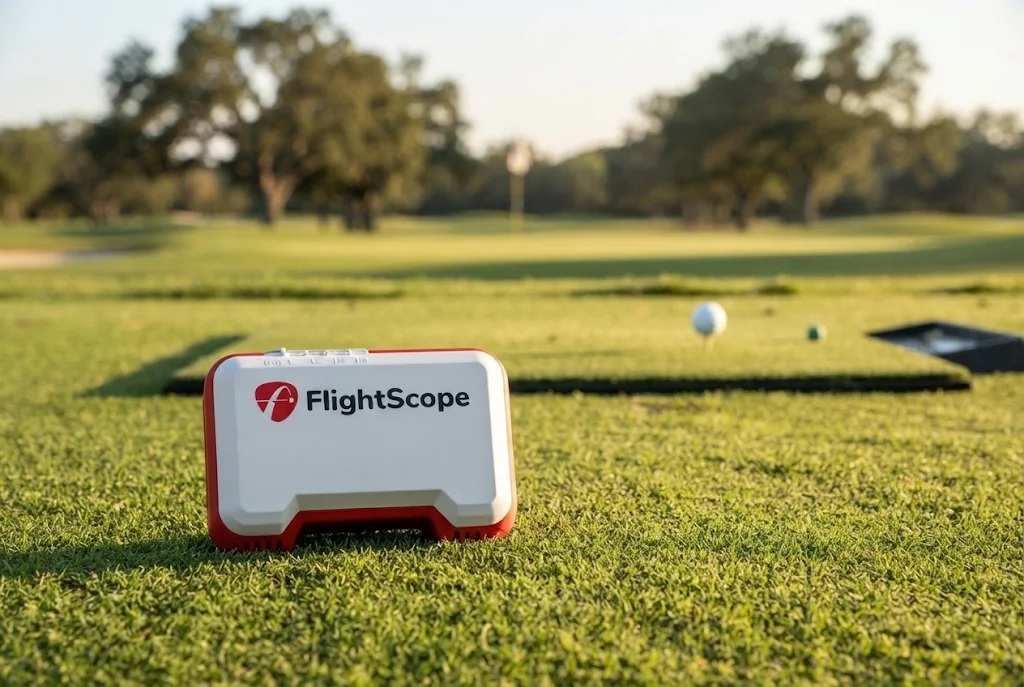
Three FlightScope units share the Mevo name, and they are not three versions of the same thing. The original Mevo is a pocket-sized radar that reports eight data points. The Mevo+ grew into a full indoor simulator unit with an included course license. The Mevo Gen2 arrived in 2025 as the manufacturer’s stated replacement for the Mevo+, with club delivery data sold as separate packages. If you already own the original, this guide is about one question: does the small radar in your bag still do what you need, or does the newer hardware actually change your practice? The original appears here as a legacy model you may already own rather than as a current purchase.

- Exceptional Portability.
- Reliable Core Data.
- Built-in Video Integration.
- No Lateral Tracking.
- Requires Metallic Stickers.
- Limited Indoor Performance.
What actually separates the original Mevo, the Mevo+, and the Mevo Gen2?
The split comes down to how each unit tracks the ball and how much data it hands you. The original Mevo uses 3D Doppler radar with no built-in camera, connects over Bluetooth Low Energy, and reports eight data points: carry distance, ball speed, club speed, smash factor, vertical launch angle, spin rate, apex height, and flight time. FlightScope’s own comparison material draws a line between measured launch inputs and calculated outputs.
The Mevo+ 2024 Edition is a Doppler radar unit with an onboard camera, and it claims more than 20 parameters overall, including angle of attack, spin loft, spin axis, launch direction, lateral landing, roll distance, and shot dispersion on top of the core numbers. The Mevo Gen2 moves to 3D Doppler radar with synchronized image processing, which FlightScope calls Fusion Tracking, and includes 20 ball and club parameters in the base unit along with integrated video, shot tracer, data overlay, and drawing tools.
Physically they are not in the same class either. The original Mevo is listed at roughly 3.55 by 2.76 by 1.18 inches and 7 ounces. The Mevo+ is 16 ounces at 6.8 by 1.2 by 4.6 inches, and the Gen2 is 6.9 by 1.2 by 5.6 inches. That pocket-sized original is still the one you can throw in a bag without thinking about it, and that is a real advantage nobody should pretend away.
Is your original Mevo still enough, or have you outgrown it?
Keep it if your practice is outdoor ball flight and nothing more. Eight metrics covers speed, strike quality through smash factor, launch, spin, and carry, which is honestly the core of range work. The manual says stickers are not required outdoors with unrestricted ball flight, so you can set up behind the ball, make sure the unit is level with your launch position with the area in front of it clear, and hit. For limited-flight or net practice, FlightScope recommends an aluminum ball sticker for optimal spin accuracy, which is setup guidance rather than any kind of accuracy promise.
You have outgrown it in two specific situations. The first is club delivery. If you want club path, face angle, angle of attack, or face impact, none of it appears anywhere in the documented eight-metric set for this model, and that is the present, documented limitation you are buying around. The second is simulation. FlightScope’s current FAQ states plainly that the original Mevo does not support simulation courses, so if the plan is to play a course indoors this winter, the original is the wrong starting point no matter what else you bolt onto it. Battery is a smaller factor, but worth knowing: the original Mevo’s manual states up to four hours, which is a manufacturer maximum rather than a measured session.
For a dated look at the small unit, our December 9, 2021 video, FLIGHTSCOPE MEVO vs RAPSODO – Which One is Best for You?, puts the original Mevo alongside a Rapsodo at that era’s roughly $500 pricing. Treat it strictly as a historical demonstration. It is not evidence for today’s prices, for current app support, or for anything about the Mevo+ 2024 Edition or the Gen2.
There is also a software reality to sit with. FlightScope described the FS Golf app as free on iOS and Android in an August 2023 article, and current app or operating-system entitlements for a 2017 device are not verified here. If you own one and it still connects and runs on your phone, that is your answer for now. If it does not, that is a decision point rather than a repair project.
Which upgrade fits better for a home bay, Mevo+ or Mevo Gen2?
The Gen2 is the one FlightScope points current buyers toward, and that matters for a long-term decision. The manufacturer states that the Gen2 is the replacement for the Mevo+, and that relationship is confirmed on FlightScope’s own pages. For a reader who plans to keep a unit for years, buying into the current platform instead of the one it replaced is the safer play.
The practical differences are easy to feel in a bay. The Gen2 sits directly behind the golfer and is usable by right and left handers without repositioning, runs about six hours on a charge, syncs automatically to FlightScope’s cloud across phone, tablet and PC, and models current weather, user-set wind direction, and elevation. It connects over its own built-in Wi-Fi network, uses Bluetooth for accessories, and integrates with The Stack System, the FlightScope i4 rangefinder, and Apple Watch. Connecting means scanning the QR code on the unit at each power-on, which is a small ritual you will either stop noticing or quietly resent.

The Mevo+ argument is software breadth. It ships with a 12-course E6 Connect license for iOS and PC, and supports E6 Connect, TGC 2019 on PC, Awesome Golf on PC and iOS, Creative Golf 3D on PC, and GSPro on PC. The Gen2 includes a permanent eight-course E6 Connect bundle with broad third-party support that also includes GSPro. Neither unit charges a recurring fee for core measured data, firmware and software updates, or the included E6 license, which is the part that keeps both of them honest; optional data packages and third-party simulator software are priced separately on top. The Mevo+ runs up to three hours per charge, approximately half the Gen2’s figure, and its box includes 100 aluminum stickers, a carrying case, power adapter, USB charging cable, and quick-start manual. Both carry a 12-month warranty in the US, and FlightScope’s EU site lists 24 months for the Gen2, so the term is region-specific. If you are already leaning away from the Gen2, read 5 Reasons Not to Buy the FlightScope Mevo Gen2 before you spend.
What do the Pro Package and Face Impact Location add, and do you need them?
Paid data packages are how both newer units handle club delivery, and they work differently on each. On the Mevo+, the optional Pro Package adds full D-plane data on top of the standard parameter set. On the Gen2, the Pro Package covers club path, face angle, and swing plane, while face impact location is sold as its own separate Face Impact Location package. FlightScope also lists Face Impact, Badger AI, and a Planning Tool as optional paid software for the Mevo+ alongside third-party simulator products.
Whether you need any of it depends on what you intend to fix. If your practice is about distance control, dispersion, and playing simulated golf, the base data on either unit already covers that, and the packages are money spent on numbers you will glance at once. If you are working on strike location and face-to-path, those packages are the entire reason to buy the unit in the first place, and you should price them in from day one rather than treating them as a maybe. Our FlightScope Mevo Plus Pro Package Upgrade guide goes deeper on that specific decision for Mevo+ owners. One note worth keeping in mind: the Mevo+ requires aluminum ball stickers in limited-flight mode, and FlightScope still recommends metallic stickers on the ball for indoor spin on the Gen2, so stickers do not disappear as you move up the line.

Improve your golf game with the FlightScope Mevo Gen2 Launch Monitor. This portable 3D Doppler radar provides accurate data on carry distance, club head speed, smash factor, and spin rate. Practice anywhere with real-time feedback.
- Accurate ball and club data
- Compact and portable
- Easy app integration
- Needs a smartphone for display
- Shorter battery life
- Relatively expensive
What did the last verified price checks show?
The Mevo+ 2024 Edition showed a $2,299 manufacturer regular price with a $1,099 street price when that was verified on October 7, 2026 at the FlightScope US Store and Golf Simulator Depot. The Mevo Gen2 base unit was listed at $1,299 direct from FlightScope when checked on July 31, 2026. On that same Gen2 check, the add-ons priced out separately: Face Impact Location brought it to $1,649, the Pro Package to $1,998, and both together to $2,274, with an optional $150 SHIELD protection plan available on top. FlightScope also listed trade-in pricing at that July check, at $1,199 moving from a Mevo to a Gen2 and from $1,049 moving from a Mevo+ to a Gen2. Those are dated checks taken on two different dates, not live quotes, so confirm the current number for each model before you buy. No price, sale, or stock status is asserted for the original Mevo, because none is verified.
Read like for like, base unit against base unit, those checks put the discounted Mevo+ $200 under the Gen2 base. The gap only opens up once you add packages: the fully loaded $2,274 Gen2 sat $1,175 above the $1,099 Mevo+ street price, more than twice the money. So the data packages, not the hardware, are what turn this from a near-even choice into a very different spend. Decide which club-delivery numbers you will actually use before you decide which unit to buy. If you want to see where both land against the wider field, the best launch monitors guide is the broader comparison.
How much room and what gear do you need to run each one?
Space is where upgrade plans usually break, so check it before you check the price. The Mevo+ has mode-specific geometry: outdoor full swing wants 8 feet from sensor to tee with unrestricted ball flight, limited-flight mode wants 8 feet from sensor to tee with 8 to 13 feet of ball flight and requires aluminum ball stickers, chipping uses 8 feet from sensor to tee with up to 50 yards of flight, and putting needs 7 feet from sensor to tee with a 12-degree tilt. Practical indoor guidance lands around 16 feet of total space, and the Gen2 is listed at approximately 16 feet of indoor space as well. Our FlightScope Mevo Plus system requirements breakdown covers that side in detail.
On the software side, the Mevo+ runs through the FS Golf app with iOS 17 or later and Android 12 or later listed on the current product page, plus Windows 10 or 11 64-bit for PC workflows. Its primary connection is Wi-Fi based rather than Bluetooth, which is a genuine difference from the original Mevo’s Bluetooth Low Energy setup. Both newer units handle full swing, chipping, and putting. The original handles full swing, and that is the shape of the whole decision in one sentence.

Frequently Asked Questions
Is the original Mevo the same as the Mevo Gen2?
No. They are different hardware, and FlightScope describes the Gen2 as the replacement for the Mevo+ rather than as a refresh of the 2017 unit. The original uses 3D Doppler radar with no camera and reports eight data points. The Gen2 uses 3D Doppler radar with synchronized image processing, called Fusion Tracking, and includes 20 ball and club parameters in the base unit along with integrated video.
Can the original Mevo play simulator courses?
No. FlightScope’s current FAQ states that the original Mevo does not support simulation courses. The Mevo+ includes a 12-course E6 Connect license for iOS and PC, and the Gen2 includes a permanent eight-course E6 Connect bundle, with both supporting GSPro on PC.
Do I still need ball stickers with any of these?
Sometimes. The original Mevo’s manual says stickers are not required outdoors with unrestricted ball flight, while recommending one for limited-flight or net practice for optimal spin accuracy. The Mevo+ requires aluminum ball stickers in limited-flight mode and ships with 100 of them. FlightScope still recommends metallic stickers on the ball for indoor spin on the Gen2.
How long does each one run on a charge?
The original Mevo’s manual states up to four hours, the Mevo+ is listed at up to three hours, and the Gen2 is listed at approximately six hours. All three are manufacturer figures rather than measured session results.
Do the Mevo+ and Mevo Gen2 require a subscription?
Neither one charges a recurring fee for core measured data, firmware and software updates, or the included E6 Connect license. Optional extras are separate costs: the Pro Package and Face Impact Location are paid data packages, and third-party simulation software can carry its own purchase or subscription price. This answer is scoped to the Mevo+ and the Gen2, because current app and software entitlements for the original 2017 Mevo are not verified here.
Conclusion: Mevo vs Mevo+ vs Mevo Gen2
Keep your original Mevo if your practice lives outdoors on a range or a field, you care about speed, launch, spin, and carry, and you value a unit you can carry anywhere without a case or a laptop. At a listed 7 ounces and roughly 3.55 by 2.76 by 1.18 inches, it is far smaller than either newer model’s listed size, and nothing about owning it is broken just because two newer units exist.
Upgrade to the Mevo Gen2 if you are building or already have an indoor bay, want club path and face data available through a package, and want to be on the platform FlightScope currently treats as its Mevo+ replacement, with the longer battery, the behind-the-golfer placement that works for both handedness, and the cloud sync across devices. Consider the Mevo+ 2024 Edition instead if the wider included course license and its specific simulator software list matter more to you than newer tracking hardware, and if its three-hour battery and mode-specific setup geometry fit how you actually practice.
Skip the whole upgrade if you only hit balls outdoors a handful of times a month, you have no indoor space anywhere near 16 feet, or the club-delivery numbers are not something you would genuinely use. There is no sense paying package prices for data you will never act on. And if you are weighing a different brand entirely before committing, Garmin Approach R50 vs FlightScope Mevo is a useful next read.

About the author
Paul Liberatore
Paul Liberatore is the founder of Golfers Authority and a former three-year golf gear contributor to Sports Illustrated. He tests golf equipment hands-on to help golfers make better buying decisions.